AI page building in WordPress: where does the AI actually write?
NoLeemits AI Design lets an AI assistant build real pages on your WordPress site as pure HTML and CSS. They sit in your own database, on any host, with any theme, and someone who doesn't code can edit them later. Each section is stored separately, so a human and an agent can edit one page without overwriting each other.
Every AI page tool can turn a prompt into a layout. That part is solved, and honestly it stopped being impressive about a year ago. The question nobody asks in the demo is the boring one that decides everything later: when the AI finishes writing, where did the output actually go?
Where does the AI actually write when it builds a WordPress page?
Into one of three places, and the one you pick decides everything you'll care about six months from now.
Your options: the vendor's hosting, a page builder's own data format, or your own database as ordinary HTML and CSS. That's the whole taxonomy. Three boxes, and every tool in this category sits in one of them.
I'd take that over a feature comparison any day. Features change every release. Storage formats basically never do, and they're what you're stuck with.
| The AI writes into… | Who works this way | What it costs you later |
|---|---|---|
| The vendor's hosting | Host-bundled AI site builders. 10Web sells the builder with hosting — "10Web provides premium hosting on Google Cloud Servers" (10web.io, checked 2026-08-10). Hostinger's is "hosting and a domain included" (hostinger.com, checked 2026-08-10). | The site and the tenancy are sold as one thing. What leaving costs depends entirely on the vendor, and it is a question to ask before you build, not after. |
| The builder's own data format | Elementor AI generates "Full pages, design systems, forms, and loops … as real, structured Elementor content" (elementor.com, checked 2026-08-10). Divi AI "works within Divi's code module" and "inside of Divi's CSS fields" (elegantthemes.com, checked 2026-08-10). | The page renders through the builder's runtime, so the builder stays installed for as long as the page exists. And the page is typically one serialized field, which matters more than it sounds — see below. |
| Your own database, as HTML/CSS | NoLeemits AI Design. Each section is template_html + content_fields + scoped_css in post meta, rendered directly. |
Nothing to uninstall before the HTML is readable. Any host, any theme, exportable as JSON or HTML. The trade is that there is no drag-and-drop canvas. |
Two things fall out of that table. Both are checkable, which is more than most things in this category can say.
Does an AI website builder lock you in?
Not contractually. Architecturally. Nobody's terms of service is out to trap you. The storage format does it without anyone having to be a villain.
I prefer that framing because it survives an argument. Accuse a vendor of wanting to hold your page hostage and you'll get a rebuttal, probably a fair one. Elementor's own page pushes back on the lock-in idea directly, calling its output "not a locked export" (elementor.com, checked 2026-08-10). Fine. Take them at their word.
The architecture underneath doesn't change either way: Elementor content is rendered by Elementor. Divi's layout generation happens inside the Visual Builder (help.elegantthemes.com, checked 2026-08-10). That's not an accusation, it's a dependency. Dependencies are fine. Accidental ones are less fine.
So ask any AI page tool one question: if I switch this off tomorrow, what's left in the database? Ask it on day one. It's a much cheaper question to answer then than after you've built forty pages on top of the answer.
What happens to my page if I uninstall the plugin?
Your sections stay in post meta, and they stop rendering. Both halves of that sentence are true, and I'm putting the second half in bold because it's the half that usually goes missing from a features page.
Deactivate the plugin and your data is sitting right there in the database, perfectly intact, being drawn by absolutely nobody.
The clean way out is Convert to Page. It bakes a Design Page's sections into
a regular WordPress page and keeps the CSS, so what's left is an ordinary page
with no idea this plugin ever existed. You've also got export_page_json and
export_page_html, and JSON exports import into other sites.
Now the caveats, because burying them would be a strange choice in a post about lock-in. Convert to Page only runs one way. So does Restore. Converting hands you a normal page, not something you can convert back. Restoring a converted page gives you one fresh section, not your original structure. Think first, click second.
That's a genuine limitation and I'd rather you read it here than discover it on a Friday afternoon. Worth the comparison, though: a builder-committed page has no equivalent button at all. There's no "bake this to static HTML and keep my styling" waiting for you. Ours is one command. It's just a door that doesn't swing both ways.
Can a non-developer edit a page the AI built?
Yes, and this is the part the whole category tends to skip. It's also the reason this plugin exists.
Generating a page is the easy half. Day 40 is the hard half. The AI isn't in the room, nobody remembers the prompt, and someone in marketing needs to change one headline before a 3pm meeting. If your answer is "ask the agent again" or "open the HTML," congratulations: your marketing page is now a developer ticket.
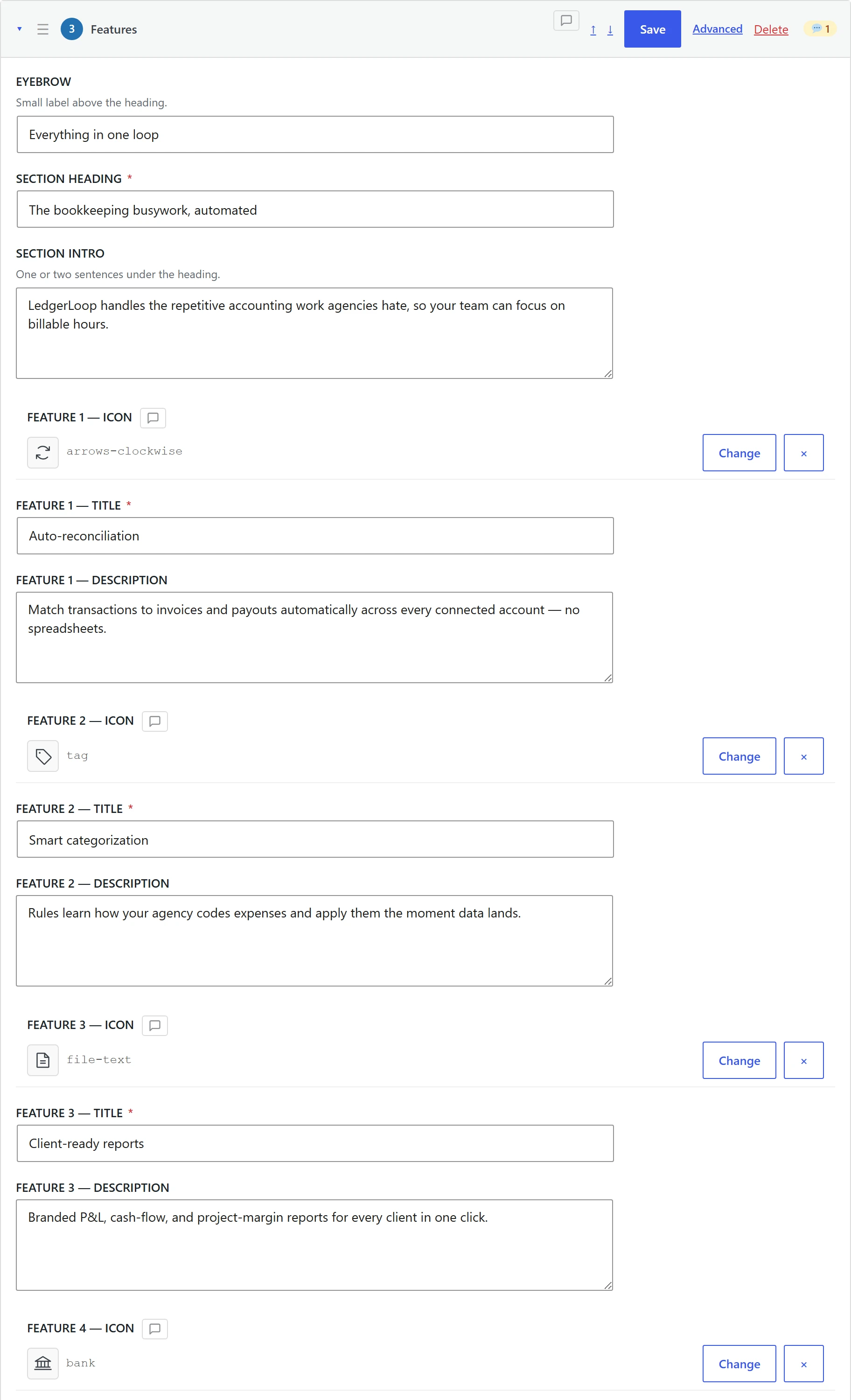
Every section carries a content_fields_schema, which declares a type, label
and description per field. That schema builds Content Mode, where an editor
gets labelled inputs (text, WYSIWYG, image picker, icon picker, colour, select)
and never has to look at markup. Developers still get Advanced Mode with raw
HTML, CSS, JS and per-section dependencies. One section, two audiences, nobody
filing a ticket.
The plugin also nags the AI about this, which I enjoy more than I expected. Since v0.21.1 it returns a low editability warning when a section is saved as mostly hardcoded text with barely any editable fields. That pushes the agent to pull the copy into real fields instead of welding it into the HTML. Left to its own devices an agent will happily hand you a gorgeous, completely unmaintainable wall of markup. This is the thing that stops it.
 Hover to pause · click for full size
What happens when a human and an AI edit the same page at once?
Nothing gets lost, because each section is versioned on its own and a stale write gets rejected instead of applied. Compare that to a page builder, which keeps the whole page in one field and lets whoever saves second quietly flatten whoever saved first.
This is my favourite argument in the post, and the reason I built this thing rather than using someone else's.
One blob per page is a concurrency bug wearing a trench coat. Page builders serialize an entire page into a single field. Two editors open it, both hit save, and the second write eats the first. No warning, no conflict, no clue. You can survive that when both editors are humans, because humans are slow and tend to shout across the office first. You cannot survive it when one of the editors is an agent doing twenty writes a minute.
Three mechanisms, all shipping today:
Sections are addressed individually. Each one is its own unit with its own version. An agent rewriting your pricing section never touches, reads back, or rewrites the hero.
Section-level optimistic locking. Writes take an if_version parameter, added
in v0.14.0. If the section moved since the agent last read it, the write bounces
instead of landing, and the agent re-reads and tries again. MCP writes respect
WordPress post locks too, returning a 409 post_locked with a force=true
override for when you really do mean it.
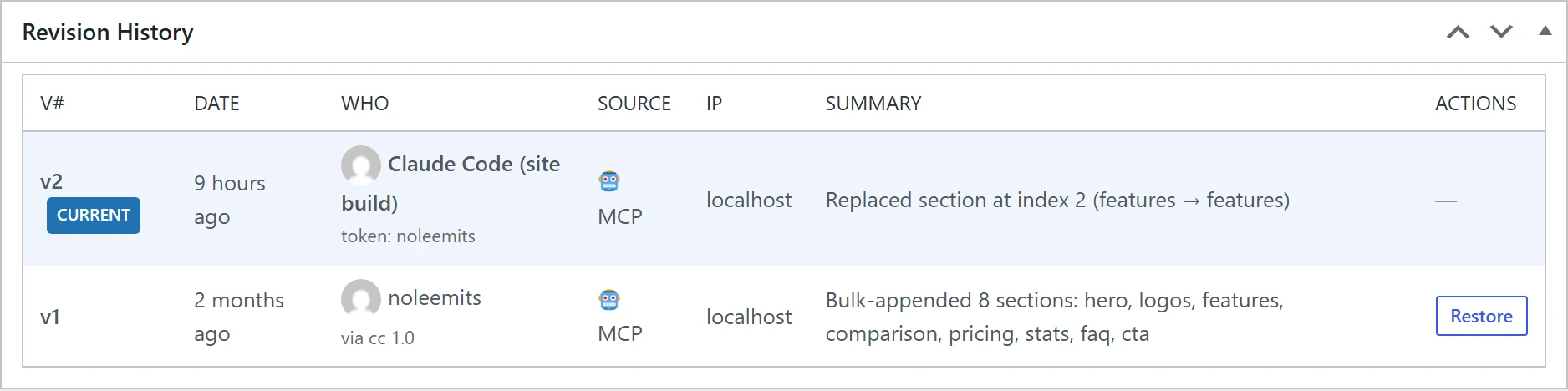
Attributed revisions. Every revision logs who (human or AI), how (admin, REST or MCP), and which client, right down to client name and version, user agent and IP. "The homepage changed and nobody knows who did it" is not a state this system can get into.
And my favourite, which I didn't expect to matter as much as it does: per-section threaded comments. An agent can pin a comment to one section or one field to flag an assumption it made. A stat it couldn't verify. A claim it basically invented. A client name it guessed. Those land in a dashboard for a human to resolve. An agent admitting what it isn't sure about, attached to the exact spot it wasn't sure about, beats any confidence score I've seen.
Put those together and you get a co-editor rather than a generator. That's the whole difference between AI that makes you a page and AI you can let keep working on one.
 View full size
What does an AI-built section actually look like in the database?
Like this. What follows is a real section from the documentation hub on this
site, pulled straight out with get_page. I didn't tidy it up for the post.
template_html — plain HTML with {{placeholder}} markers:
<section class="aid-phead">
  <div class="aid-phead__orb"></div>
  <div class="aid-phead__inner">
    <span class="aid-phead__badge">{{badge}}</span>
    <h1 class="aid-phead__title">{{title}}</h1>
    <p class="aid-phead__desc">{{description}}</p>
  </div>
</section>
content_fields — the values, kept separate from the markup:
{
  "badge": "Documentation",
  "title": "Documentation",
  "description": "Everything you need to install NoLeemits AI Design, connect an AI assistant to it, and hand the result to someone who has never seen the plugin before."
}
content_fields_schema — what makes it editable by a non-developer:
{
  "badge":       { "label": "Eyebrow",          "type": "text" },
  "title":       { "label": "Page title (H1)",  "type": "text", "required": true },
  "description": { "label": "Intro",            "type": "textarea" }
}
scoped_css — styling that belongs to this section and nothing else:
section.aid-phead {
  background: #1a1a2e;
  padding: 4.5rem 5% 4rem;
  position: relative;
  overflow: hidden;
  font-family: 'Inter', sans-serif;
  text-align: center;
}
h1.aid-phead__title {
  font-family: 'Space Grotesk', sans-serif;
  font-size: clamp(1.85rem, 3.6vw, 2.7rem);
  font-weight: 800;
  color: #fff;
}
There's no fifth thing. No serializer, no block grammar, no builder runtime
quietly resolving that into something else on the way to the browser. {{title}}
gets swapped for the value of title, and the result ships. That's the trick.
There isn't a bigger one hiding behind it.
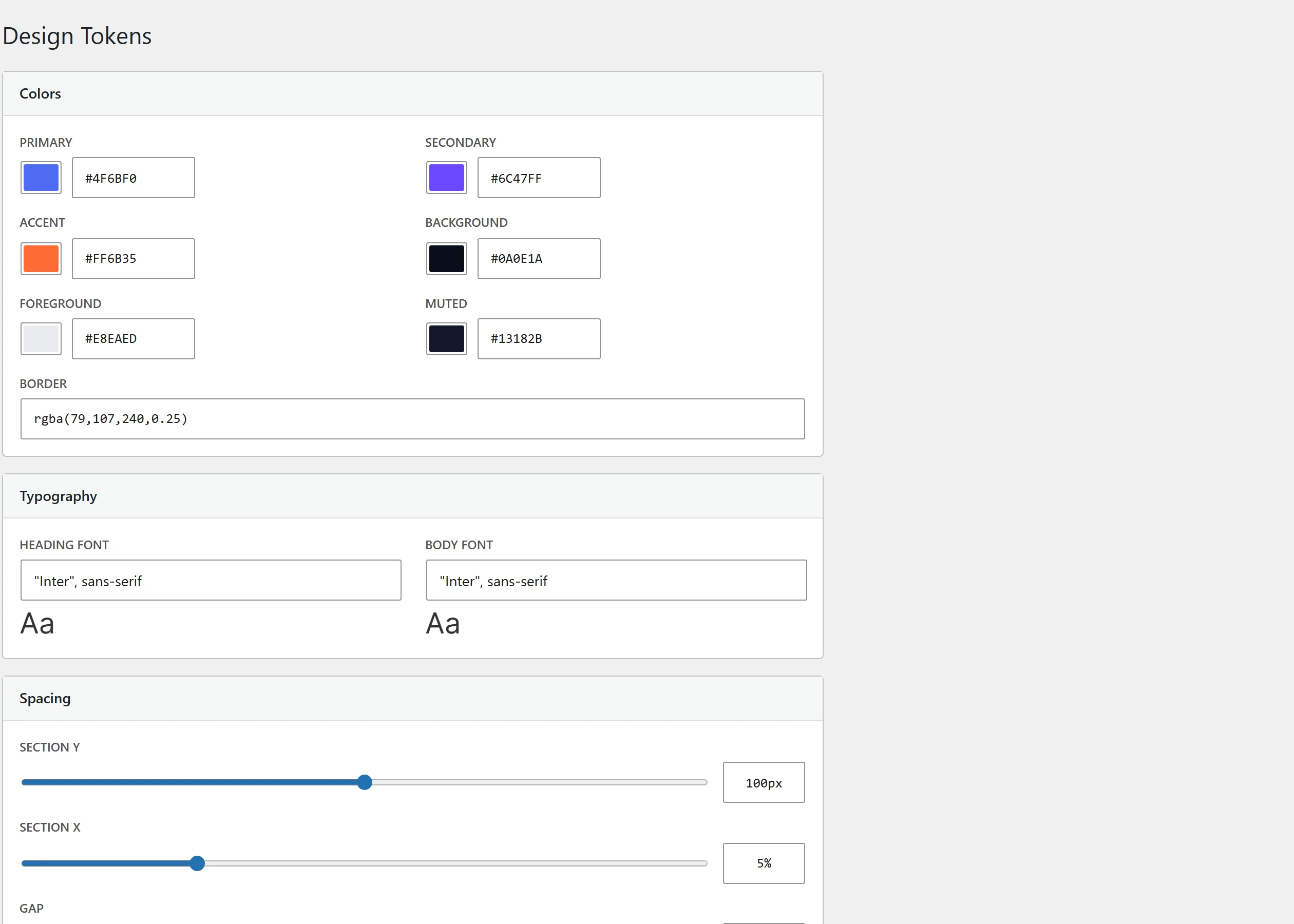
Site-wide consistency comes from design tokens, CSS custom properties the agent reads before it writes a single line. The live values on this site:
{
  "colors":  { "primary": "#667eea", "secondary": "#764ba2", "accent": "#f093fb",
               "background": "#ffffff", "foreground": "#1a1a2e" },
  "fonts":   { "heading": "'Space Grotesk', sans-serif", "body": "'Inter', sans-serif" },
  "spacing": { "section-y": "80px", "section-x": "5%", "gap": "2rem" },
  "shape":   { "radius": "12px", "shadow": "0 4px 24px rgba(0,0,0,0.06)" }
}
Change --ppd-primary once and every section that referenced it follows along.
This is the thing standing between you and eleven subtly different shades of blue
scattered across your site, each one confidently described as "the brand colour."
The best version of this argument isn't the code sample though, it's the site you're reading it on. noleemits.com/ai-design/ was built this way, by an AI agent, through this plugin. View source and see for yourself. It's just HTML.
 View full size
Which AI assistants can actually drive it?
Tested with Claude Desktop, Claude Code and the Anthropic SDK. Other MCP-capable clients should work, but they're unverified, and I'm not writing "works with any AI assistant" on a box I haven't opened.
The transport is nothing exotic: MCP over Streamable HTTP, protocol revision 2025-06-18, with 2025-03-26 and 2024-11-05 still accepted. So "should work" is a fair bet rather than wishful thinking. It's still not a test result, and I know the difference.
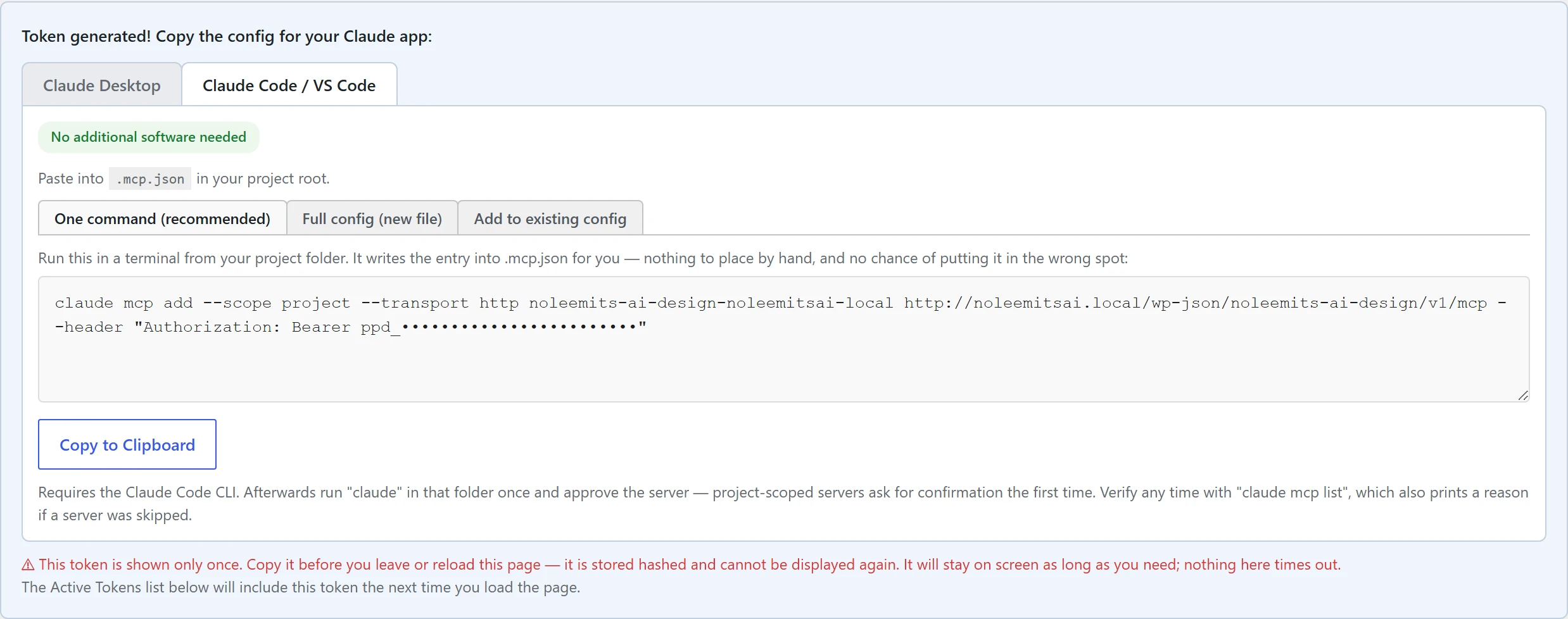
The MCP server ships inside the plugin. One bearer-token endpoint on your own domain. No vendor relay, no account with me, nobody sitting in the middle of your agent and your database. It exposes the whole page-building surface: create, patch, move and replace on sections, plus variants, versions, templates, images, translation, validation and audits.
I'm deliberately not putting a tool count in this sentence. It changes every release, and a number frozen into a blog post is a number that quietly becomes a lie. The current count and version live on the features page and the release notes, both of which are generated from the plugin itself rather than typed in by hand. If you want today's figure, that's where it's true.
The admin is pure vanilla JavaScript, so no jQuery and no bundler, and the Phosphor icon set is available to any section. Getting Started has the current WordPress and PHP requirements.
 View full size
What this doesn't do
- It's not a drag-and-drop canvas. If nudging boxes around with a mouse is your idea of a good afternoon, you want a page builder, and you should go get one. This is for people who'd rather describe a change than hunt for it.
- Uninstalling stops the rendering. Covered above. Run Convert to Page first, and remember that Convert to Page and Restore both only go one direction.
- Client support is narrower than "any AI." Three tested clients. That's the claim, and it's staying that size until I've tested more.
- It's not an SEO plugin. It emits clean semantic HTML and deliberately stays out of Yoast, RankMath and SEOPress's way. The built-in LocalBusiness JSON-LD is opt-in and tells you when it spots a conflict.
- It's paid, with no free tier. Annual, with a 14-day trial. A card is required to start it, but you're not charged until it ends and you can cancel before then. Kicking the tyres beats reading about the tyres.
Already committed to Elementor?
Then this is the wrong plugin for you, and I'd rather say that than sell you something that fits badly.
Plenty of sites should stay in Elementor. You've got an established design system, a team that knows it, a client who happily edits their own pages in it. Tearing that out to avoid a dependency you're perfectly comfortable with is a bad trade, and anyone telling you otherwise is selling something.
For those sites we build Vision Builder Control, which drives and audits Elementor over the same MCP approach and speaks Elementor's format natively. Two different jobs: Vision Builder Control for sites that need to stay in Elementor, NoLeemits AI Design for sites that never wanted a builder in the stack at all.
FAQ
Do I need an AI account to use this plugin? Nope. Content Mode and Advanced Mode work perfectly well with no AI connected to anything. The MCP server is entirely optional. Switch it on only if you want an assistant writing pages for you.
Will my content survive if I uninstall the plugin? The data survives, since sections live in post meta as a JSON-serializable array. It stops rendering, though. Run Convert to Page first and the section gets baked into a regular WordPress page with its CSS intact. That conversion only goes one way, so do it deliberately.
Does it work with my theme?
Yes. You get two render modes. In full, the plugin owns the whole <body> and
supplies the header and footer from global sections. In content, your theme
keeps its own header and footer, and the plugin fills the content area. Set it per
post type or override it per post. Block themes work fine, archive
templates included.
Does it work alongside Elementor, Divi or Bricks? Yes, by getting out of the way. Spot a builder on a post and the plugin disables itself for that post automatically. You can also switch it off per post type. No turf war over who owns the page.
Which AI assistants is it actually tested with? Claude Desktop, Claude Code and the Anthropic SDK. It speaks MCP over Streamable HTTP, so other MCP clients should be fine. They're unverified though, and until somebody builds a real page through one, "should" is the only honest word for it.
Architecture described here was verified against the plugin source on 2026-08-10. Version-specific figures are deliberately kept out of this post and live on the release notes instead, which are generated from the plugin. Competitor claims cite each vendor's own current page, with the date checked. Where a claim couldn't be sourced from a vendor page, it isn't in this post.
Want to see this on your own site?
Talk to us — we’ll build a real page live, not a canned demo.