Everything it does
Every claim below is true of the shipped build. Every paid tier gets all of it; tiers differ only by how many sites you can activate on.
What it is
A WordPress plugin that lets an AI assistant design real pages on your site in pure HTML and CSS, with no page builder and no block format, and leaves every one of them editable by a non-technical person afterwards.
Around that core it can install a complete ready-made site from a design system, work with the plugins you already run (Advanced Custom Fields, Gravity Forms, JetFormBuilder, Contact Form 7, Rank Math, Yoast, WPCode, WooCommerce), and let your editors change text and images right on the live page.
The core model
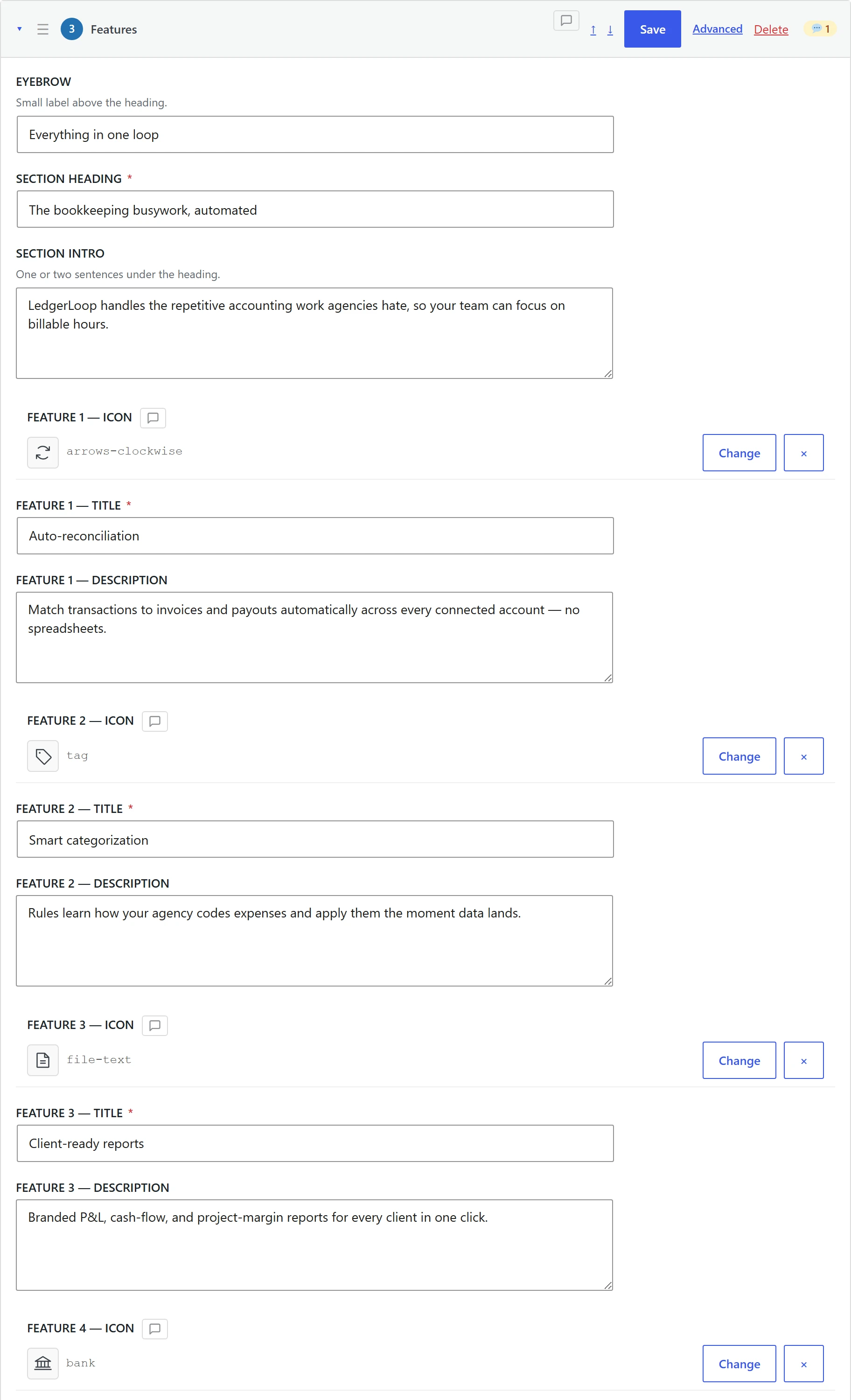
Every page is a list of sections. Every section is four things:
| Part | What it holds | Who edits it |
|---|---|---|
template_html |
The markup, with {{placeholder}} markers |
AI, or a developer in Advanced Mode |
content_fields |
The actual text, images, links, icons | Anyone, in a friendly admin form or on the live page |
scoped_css |
CSS scoped to that section | AI, or a developer |
section_js |
Optional JS, in an IIFE with the section pre-bound | AI, or a developer |
This split is the whole product. Design changes need the AI; content changes never do.
Placeholder prefixes decide how a field is treated and rendered:
html_*: allows safe HTML (bold, links, cleaned inline SVG)image_*: media picker, with a companion*_altfieldicon_*: Phosphor icon picker, resolved to inline SVG that inheritscurrentColorshortcode_*: run throughdo_shortcode()on render- plain: escaped text
Repeat and if blocks keep lists editable. {{repeat:s}} … {{/repeat}} draws one card per filled item, and {{if:key}} … {{else}} … {{/if}} hides a part when its field is empty. An editor can add a fourth card or drop a button without touching the markup.
Plus site-level placeholders that resolve at render time: {{site_name}}, {{site_url}}, {{current_year}}, {{wp_menu:location}}, {{business:*}}, {{acf:*}}, and the full {{post_*}}, {{archive_*}}, {{term_*}}, {{product_*}} and {{loop_*}} families for templates.
Editing
Content Mode: for the person who inherits the site
A generated form, one labelled input per content field, with the type the field deserves: text, textarea, WYSIWYG, URL, image picker, icon picker, colour picker, number, select. Descriptions and placeholders come from an optional content_fields_schema the AI can attach while it builds, and long sections group their fields into collapsible blocks. No HTML is ever required, and no AI tokens are spent.
Quick edit on the live page
Switch it on from the admin bar, then type straight into headings, paragraphs, menus and footers on the real page, swap images from the Media Library, and change where links point. Global headers, footers, shared sections and menu labels ask before they save, because the change reaches other pages. Text that comes from somewhere else (business info, loops, custom fields, WooCommerce, icons) is marked and links to the place it is edited. Every save goes into a history on the page that you can go back to. Visitors never see any of it, and none of it is cached. How quick edit works.
Advanced Mode: for the developer
Raw template_html, scoped_css, section_js and dependency lists, per section, in the same screen.
The editability guarantee
When the AI saves a section that is mostly hardcoded text with few or no editable fields, the plugin warns it during the write that Content Mode users will not be able to edit it, nudging the copy into fields instead of into the markup. Sections that slipped through show a notice in the editor pointing at the code editor. This is the mechanism that stops AI-built pages from becoming black boxes.
Section-level concurrency
Optimistic locking via an if_version parameter, plus WordPress post locks honoured on every MCP write (409 post_locked, with an explicit force override). A human and an agent can work the same page without silently overwriting each other.
 Hover to pause · click for full size
Output & performance
- Pure HTML/CSS. No block format, no shortcode serialization, no builder runtime.
- Zero frontend JavaScript by default. GSAP, ScrollTrigger, AOS, Alpine.js, Swiper, Splide, Plyr, CountUp, Typed.js, Lottie and HTMX are available, and each loads only on pages whose sections declared it. You can register more CDN libraries in Settings.
- No jQuery, in the admin or on the front end. The admin UI is vanilla JS with no build chain.
- Images optimized at render time:
srcset,sizes,width,height,loadingandfetchpriorityare added automatically. Nobody has to remember to do it, and the AI is told not to hand-roll them. - CSS isolation: a scoped reset shields sections from theme CSS without out-specifying your own rules.
- Site components load only where used. A
nad-*button or badge prints its CSS and JavaScript only on pages that contain it. - CSS minification that correctly preserves
calc(),clamp(),min(),max()andvar(). - Caches cleared for you. Saving a section purges WP Rocket, FlyingPress, LiteSpeed, W3 Total Cache and others, then requests the page once so the server rebuilds it. Anything it could not reach is named in the response.
No lock-in
- Export as JSON: move a page between sites.
- Export as standalone HTML: take the design somewhere else entirely.
- Import JSON across sites, with an optional publish status.
- Convert to Page: turn a Design Page into a regular WordPress page. Sections, page CSS and JS, layout mode, SEO fields and every other page setting come across, and the result confirms the page's styles still print.
- Restore to Design Page: go back the other way.
- Design system imports are copies. A newer version of a design system never changes pages already on your site.
- Uninstalling leaves your sections in post meta as plain JSON-serializable data.
Tokens, components and the shared library
- Design tokens: site-wide CSS custom properties (
--ppd-*) for colours, fonts, spacing and shape. Change once, every page follows. Every change is kept in a history you can restore from, and token declarations are stripped from page CSS on save so a stale hex can never shadow a live token. - See a change before you make it. Before a token or component change, the AI can list every page it reaches (including through shared sections and the global header and footer), open real pages side by side before and after, and run a site health check that finds pages still using styles that no longer exist. Header and footer changes have their own history with one-step restore.
- Site components: define a button, badge or small script once as a
nad-*class and use it on any page. Every rule must sit under its own class, so a component can never restyle your theme. - Style guide: the AI reads the site's design language (palette, type scale, CSS patterns, layout principles) before it designs anything.
- Component templates: proven skeletons the AI starts from instead of improvising, such as timeline, vertical tabs, bento grid, accordion, pricing table, comparison table, testimonial carousel, logo marquee, split hero, stats counter, step process, navigation dropdown and mega menu, and contact blocks that use your form plugin or your phone and email instead of a fake form.
- Global sections: header and footer defined once and added to every page, with per-page overrides and a per-page on/off switch.
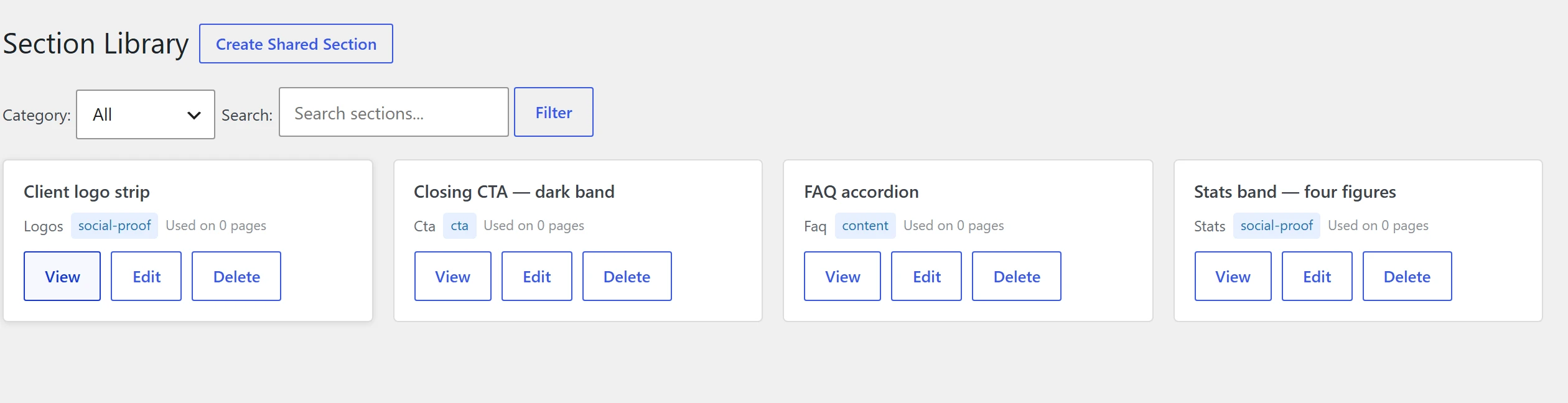
- Shared section library: save any section to the library and reuse it across pages; edit the library item and every page using it updates. Library previews snapshot the source page's CSS so they render faithfully.
- Business info globals: phone, email, address, social profiles set once and referenced anywhere as
{{business:*}}, with auto-generated LocalBusiness JSON-LD (opt-in, and it warns when another SEO plugin is already emitting schema). - Icons: 104 Phosphor icons shipped, 1,500+ more searchable by name and fetched on demand, in outline and fill styles, sized via CSS and inheriting text colour.
 View full size
Design systems: a whole site to start from
A design system is a ready-made site built on one look: a home page, inner pages, a blog, post and category templates, a header, a footer and menus.
- See every page before you import. The Design Systems board shows every page side by side on desktop and phone. Change the colours, buttons, corners, shadows, spacing and heading font, remove eyebrow labels or switch the hero layout, and every page updates at once.
- Import what you need: the whole site, only the pages you are missing, or just the style. A dry run lists what will change first, including your header, footer and homepage, and asks before replacing a page someone has edited.
- Undo in one click. Every import is recorded, and undo puts the site back as it was, newest import first.
- Forms that work. Contact forms are created in your form plugin. With no form plugin, they become phone and email buttons instead of a form that goes nowhere.
- Pages from another builder are never touched. Elementor, Divi, Beaver Builder, Bricks, Oxygen and WPBakery pages are skipped.
- A section library, too. Any section from a design system can be added to an existing page, styled to match the choices you made on the board.
- Your own. Save your current site as a design system, or save a new look onto an existing one, and reuse it on the next build. These stay on your site.
Calm Clinic and Bright Dental ship with the plugin, and more install from the catalogue on the same screen. Catalogue downloads are checked against a signature before anything is installed. How design systems work.
Integrations with the plugins you already run
Each integration has its own switch under Settings > Integrations, so the assistant only sees tools for plugins you actually use. All of them ship in every tier.
Advanced Custom Fields
The AI can create custom post types, taxonomies, field groups and options pages from chat, read and write field values, and export or import ACF JSON. Any field shows in a design with {{acf:*}} placeholders, including repeaters, galleries and flexible content. Placeholders keep working on pages built earlier even if you switch the tools off.
Forms: Gravity Forms, JetFormBuilder, Contact Form 7
Read and edit forms from chat and embed them by shortcode, one switch per plugin. JetFormBuilder forms get the most: one email changed at a time, record saving, every change backed up and undoable, email previews with sample answers, and a choice between AJAX and page-reload submits. An email with an empty body cannot be saved, and when a submission fails the form says which step failed and the mail error. Submitted entries are never readable by any AI tool; only counts are.
SEO: Rank Math and Yoast
Set a page's SEO title, meta description, focus keyword, robots, canonical URL and social previews from chat, and the same for category and tag archives. With Rank Math the AI can also set the site-wide schema details and manage redirects; with Yoast it can set the site identity (company or person, logo, social profiles, website name). Every reply names the SEO plugin it wrote to, and nothing is saved when no SEO plugin is active.
WPCode snippets
Create, edit, switch on or off and undo code snippets from chat. PHP snippets need a second switch that only a person in wp-admin can turn on; the AI cannot turn it on for itself.
WooCommerce
Product pages, shop archives, product rows, cart count, cart and checkout, covered under Templates below.
The integration tools have the same names and give the same answers as in Vision Builder Control, so a site running both plugins gets one copy of each. Setting up integrations.
Templates, not just pages
Assign a Design Page as the template for:
- Single posts and any custom post type
- Category, tag and custom taxonomy archives
- Post type archives
- Search results, date archives, and 404
- The homepage
Template placeholder families resolve at render time ({{post_*}}, {{archive_*}}, {{term_*}}, {{post_type_archive_*}}, {{search_query}}, {{paged_*}}), {{post_toc}} builds a table of contents from a post's headings, and assignments can be tested before they go live. Post lists support category chips, search and Load More in place, without a page reload. Template pages themselves return a 404 to visitors, carry noindex and stay out of WordPress, Yoast and Rank Math sitemaps.
WooCommerce
- Design the shop archive with a real
{{main_query}}loop and{{loop_wc_*}}placeholders for price, sale badge, rating and add to cart. - Product pages with a real add-to-cart form, variable products included, in either render mode: full (plugin owns the page, globals included) or content (theme header and footer, sections as the body).
- Product rows anywhere: featured, on sale, best selling, related, or by category.
- A live cart count in your header, and designed cart and checkout pages.
- Working price slider, category dropdown and sort filters, driven by URL parameters.
- Proper
template_includeintegration, so WooCommerce'spre_get_posts, Yoast and Rank Math head output and pagination all stay intact.
Working with clients
Front-end review mode
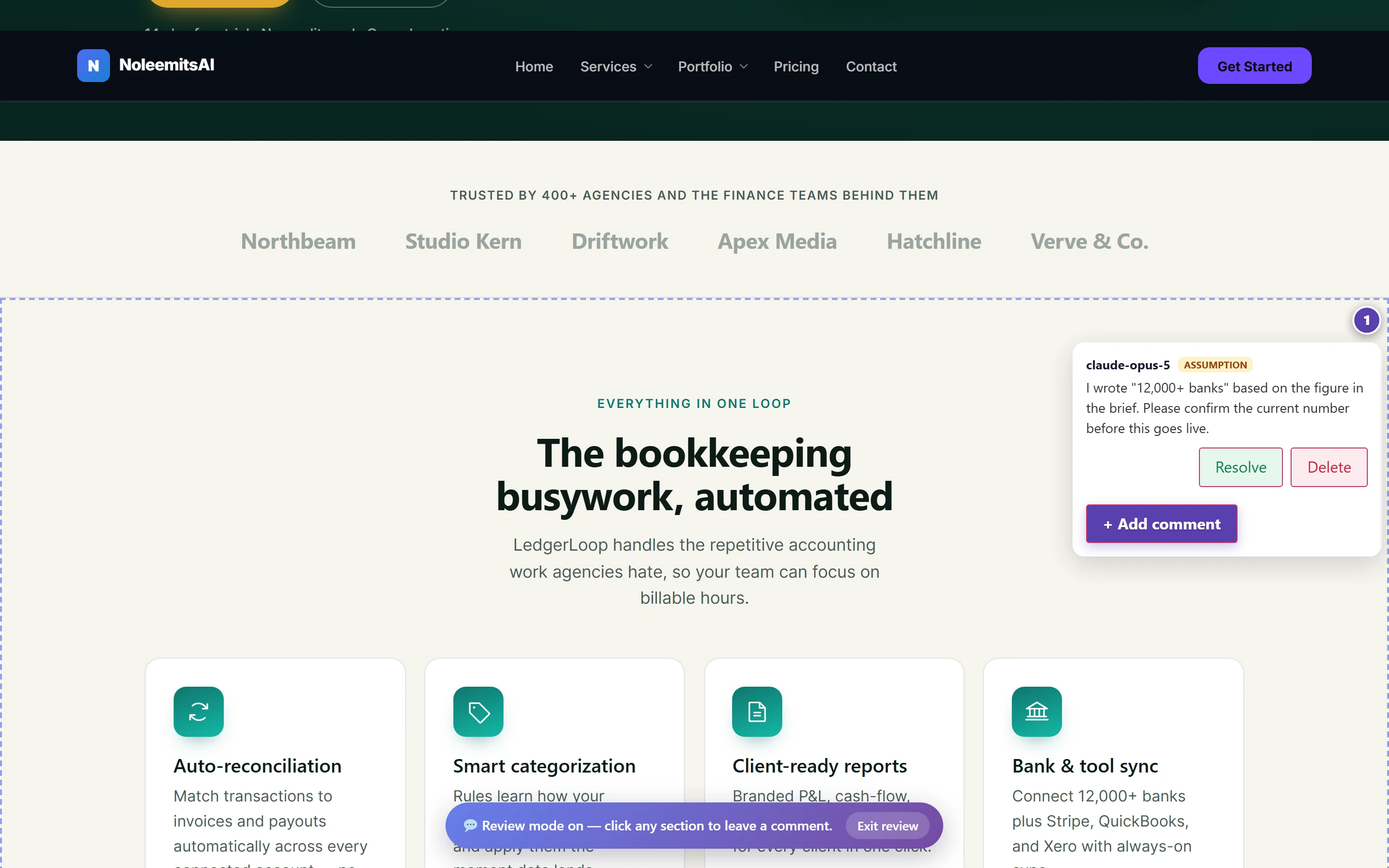
A Comments menu in the admin bar for anyone who can edit. Turn review mode on, click any section on the live page, and leave feedback pinned to it: a question, an assumption, a note, or a warning. Sections with feedback show a numbered marker; open it to read the thread and resolve or delete in place. Invisible to public visitors: the overlay only loads for logged-in editors with review mode on.
Comments dashboard
Every thread on the site in one screen, with an open-count indicator in the admin bar. Comments whose section was later deleted collect in an orphaned tray instead of vanishing. The AI can read and write these threads too, so it can flag an assumption for a human to confirm rather than guessing.
Shareable preview links
A private 24-hour link that opens without a WordPress login, for a client, a phone or a screenshot tool. It is never cached or indexed, keeps working while you keep editing, and can be revoked early.
Revisions with real attribution
Every revision records the actor (human or AI), the route (admin, REST or MCP), the client name and version, the user agent and the IP, including publishing, trashing and restoring. The history screen has a "Who" column. Restore any version. Retention is configurable: max versions per page, retention in days, WP-Cron cleanup.
Role access
A Settings > Access tab lets administrators grant Design Page management to any role, independent of normal post editing. Granted roles get their own self-service MCP Connection screen and can generate and revoke their own tokens; they see only their own. Settings and the library registry stay administrator-only. The rule is enforced identically in the admin, the REST API and over MCP.
White label and agency attribution
Rename the plugin and hide the developer's links and account screens with a wp-config.php constant, or keep the product name and point Docs and Support at your agency instead.
 View full size
Fitting an existing site
- Two render modes, set per post type and overridable per post: full (the plugin owns the whole document; header and footer come from global sections) and content (your theme provides header and footer; sections render into the content area).
- Any theme, block themes included, also for archive templates.
- Global header and footer on theme pages. Keep your theme or builder for the page body and still use the Design Pages header and footer site-wide, with an option to hide Divi's own.
- Builder conflict detection: Elementor, Divi, Beaver Builder, Bricks, Brizy, Oxygen, Thrive and WPBakery are detected per post, and the plugin stays out of the way there. The other builder's data is untouched and switching is reversible.
- Works next to Vision Builder Control. When both plugins are installed, the AI asks which builder a new page should use instead of picking one, and a page owned by one builder is never silently written over by the other. Settings > Builders shows what overlaps.
- Per-post opt-in for non-default post types; enable or disable a whole post type in Settings.
- Shortcode embeds:
[ppd_page]and[ppd_section]drop a design into a normal post or another builder's page, carrying its CSS and external stylesheet links with it. - Third-party widgets: documented patterns for all three shapes: shortcode-based (CF7, WPForms, Gravity Forms, Fluent Forms, Trustindex), script-plus-container (Trustpilot, Elfsight, SociableKit) and iframe (Calendly, Typeform, Maps). Installed form plugins and their real forms are listed for the AI so it never guesses an ID.
- No fake forms. A hand-written form that submits nowhere is flagged to the AI when it is written, made inert on the live page so a visitor never gets a false success, and outlined for editors only. Visitors never see the notice.
The MCP server
One Streamable HTTP endpoint on your own site. Protocol revisions 2025-06-18, 2025-03-26 and 2024-11-05 are all supported, negotiated down to whatever the client understands. The endpoint address is read from WordPress itself, so it is correct on plain-permalink sites and subdirectory installs.
Connecting
Settings > MCP Config walks you through four steps for your client, with guides for Claude.ai, Claude Desktop, Claude Code, ChatGPT, Codex, Cursor and any other MCP client. Three ways in:
- Browser sign-in: paste the address into the client and approve it in WordPress. No token to copy.
- Connector link: a private address with its own key, for hosts that block the sign-in step. The screen detects that case and leads with the link.
- API token: a one-click
.mcpbbundle for Claude Desktop, a singleclaude mcp addcommand for Claude Code, or a copy-paste config block.
Every connection is listed on the same screen and can be revoked there.
Read-only connections
Grant an assistant "Read only" and it cannot even see the tools that would change anything. It can still inspect pages, tokens, settings and health.
Compact tool mode
Add ?tools=compact to the MCP address, or make it the site default, and the assistant starts with a small finder (find, describe, run) instead of the full tool list. That saves around 50,000 tokens per conversation, and every tool is still one search away. When you switch an integration on or off, connected clients are told the tool list changed.
What the tools cover
| Group | Examples |
|---|---|
| Pages | create_page get_page update_post publish_page render_page validate_page get_preview_url convert_to_page |
| Sections | append_section insert_section patch_section replace_section move_section delete_section |
| Library and globals | create_shared_section set_global_sections set_business_info set_menu set_site_component |
| Design | start_project get_style_guide set_design_tokens get_component_templates get_best_practices list_icons |
| Design systems | list_kits import_kit undo_kit_import list_kit_catalog install_kit insert_kit_section |
| Change safety | get_design_impact get_design_preview get_design_health list_design_changes restore_design_change |
| Templates | create_template_assignment list_template_assignments test_template_assignment |
| Media | import_image import_images find_images generate_image insert_image |
| Integrations | create_acf_field_group set_acf_values update_jfb_form update_seo manage_redirects create_wpcode_snippet |
| Feedback and versions | add_comment resolve_comment list_versions restore_version get_edit_lock |
| Transfer | export_page_json export_page_html import_page scrape_page_html compare_to_source |
| Site | check_health get_plugin_settings update_plugin_settings list_forms bust_cache |
The AI does not design blind: start_project, get_style_guide, get_best_practices, get_section_examples and get_component_templates give it your site's design language, your tokens and proven skeletons before it writes a line.
Also included
- Media from anywhere: the assistant can import images from a web address or straight from your computer, up to 25 at a time, including SVG logos (cleaned of scripts before they are saved). Re-imports of the same file are reused, not duplicated.
- Rebuild checks:
compare_to_sourcelists what is on an old page and missing from the rebuilt one, and says whether the new page is visible to the public. - Real WordPress menus in any section, as deep as you choose, and the AI can set a menu location without opening Appearance > Menus.
- A/B variants: create and manage alternate versions of a page.
- Translation:
translate_pagewith WPML and Polylang awareness; the page list shows language. - Auto-build: hand
auto_build_pagea brief and get a whole page back. - Site migration input:
scrape_page_htmlandfetch_external_htmlpull an existing page's markup in so the AI can rebuild it as sections. - Taken slugs are refused rather than quietly given a
-2suffix, so a new page never lands on a URL nobody expected. - WP-CLI:
wp ppd page create --file=page.json. - Onboarding wizard on first run.
- JS/CSS library registry: register additional CDN libraries for sections to depend on.
- WPML config shipped for translatable strings.
Reference: what ships this at the plugin level
includes/class-renderer.php (rendering and placeholders), class-section-blocks.php (repeat and if blocks), class-mcp-server.php (the tool definitions), class-content-schema.php (Content Mode field types), class-quick-edit.php, class-design-tokens.php, class-site-components.php, class-shared-sections.php, class-global-chrome.php, class-kits.php + class-kit-components.php + class-kits-catalog.php (design systems), class-design-usage.php, class-design-history.php, class-design-preview.php, class-design-health.php, class-template-assignments.php, class-woocommerce.php, class-acf.php, class-forms.php, class-form-guard.php, class-seo.php, class-wpcode.php, class-variants.php, class-comments.php + class-comments-frontend.php, class-versions.php, class-roles.php, class-oauth.php, class-builder-compat.php, class-peer-builders.php, class-business-info.php, class-icons.php, class-svg-sanitizer.php, class-cache.php, class-export.php / class-import.php, class-source-compare.php, class-shortcodes.php, class-auto-builder.php, class-pixelvault.php, class-cli.php. The integration drivers live in lib/noleemits-integrations/ and the sign-in layer in lib/noleemits-connection/, both shared with Vision Builder Control.
Want to see it on your own site?
Talk to us. We will build a real page live, not a canned demo.