The AI Agent That Builds Elementor Pages — and Audits Any WordPress Site
Connect Claude (or any MCP client) to WordPress once. Vision Builder Control gives it 296 tools to build and edit Elementor pages natively, audit any WordPress site — Elementor or not — and hand the result back to a human who can still edit it.
Currently on v4.423.2. Built by an agency that runs it on its own client sites every day, not a weekend side project.
 Hover to pause · click for full size
Building Is Only Half the Job
The AI-built page becomes a black box. Styling gets baked into hidden CSS the client can't find, let alone change, in the Elementor editor — so every future edit request comes back to whoever originally built it.
Nobody's checking whether the resulting pages are actually good — fast, accessible, indexable, free of broken links — until a client complains.
It Builds AND It Audits
Most agentic Elementor tools stop at building. Vision Builder Control ships with a full audit suite — SEO, performance, accessibility, content, links — as a first-class part of the product, not an afterthought.
Every audit runs whether or not Elementor is even active, so it doubles as a general WordPress health check for sites you don't build with Elementor at all.
What It Does That the Others Don’t
Six things to check for when you compare this against anything else.
It Never Builds Something the Client Can’t Edit
Every page it authors goes through native Elementor settings and real, named style classes — never hidden, page-specific CSS. A dedicated Editability check flags any page a human editor would get stuck on, including the ones Elementor itself would refuse to save.
Leaving Is a Planned Step, Not a Cliff
Any V4 section can be converted to ordinary HTML that keeps working — and stays editable in WordPress — with the plugin removed. It refuses rather than guesses: anything it can’t safely convert is listed by name, and it tells you how much of the page still depends on the plugin.
The Audits Tell You What They Couldn’t Check
Every report says whether it checked everything, part of it, or nothing — with a count of what it skipped and why. An unreadable page used to score as clean. No competitor advertises this, because it means admitting a limit.
Point and Click, or Just Ask
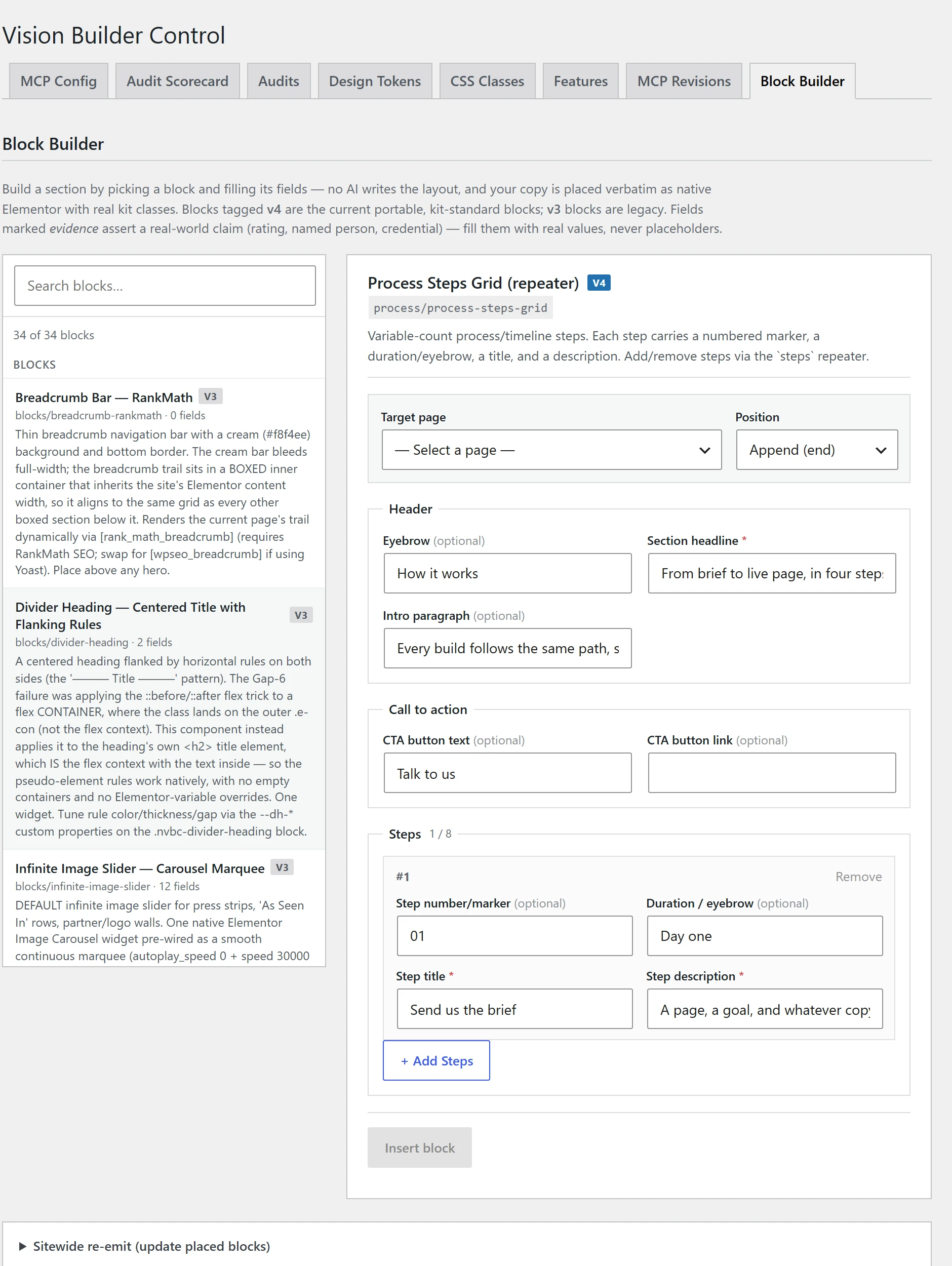
The Block Builder is a real admin screen: a searchable block library, a form built from each block’s own fields, and a target page. No AI client needed. Update one block and re-render every placement of it across the site in a single step.
It Connects the Way Your Client’s Setup Actually Works
Three ways in: plain HTTP (paste a URL and a password — no Node install), the original Node/stdio connection for Claude Code, or WordPress’s own Abilities API on WP 6.9+. Whatever your client or your own team is running, it connects.
It’s Safe to Hand to Someone Else
Every connection can be scoped to exactly what it’s allowed to touch — audit-only, content-only, full builder, or full admin — and a scoped connection can never do more than the underlying WordPress account already could. Every change is logged against the named connection that made it.
 Hover to pause · click for full size
Six Skills, Six Scored Reports
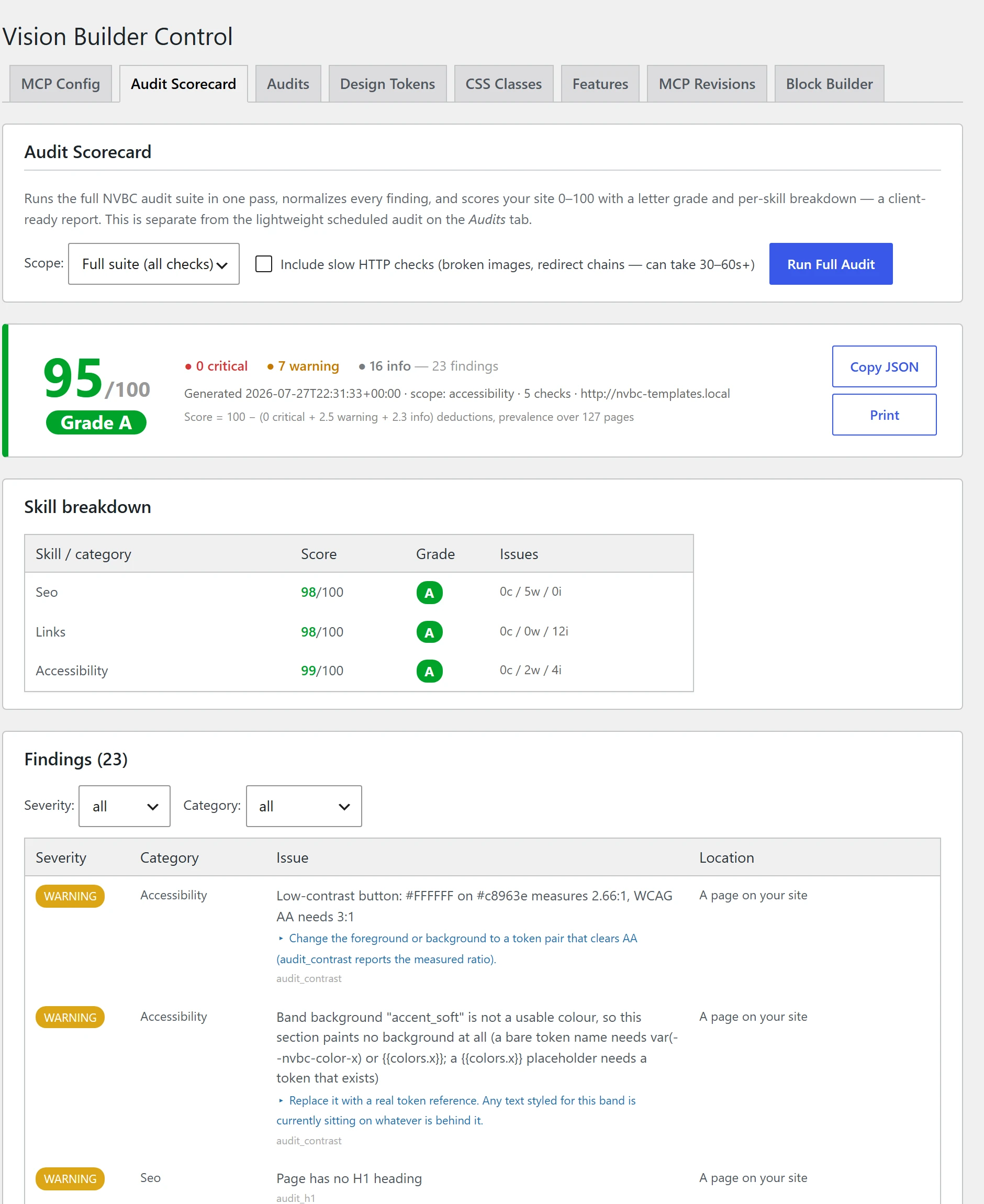
Each Skill is a scored, client-ready audit report.
SEO
On-page SEO, heading structure, FAQ schema, broken links, redirect chains, orphan pages.
Performance
Page weight, oversized images, unused CSS.
Accessibility
Controls a screen reader can’t name, labels pointing at fields that don’t exist, duplicate IDs — plus a list of what still needs a human eye.
Content
Placeholder text, broken images, clickable-element issues, CTA quality.
Links
Link validation, redirect chains, orphan pages.
Editability (Elementor only)
Flags any page styled in a way a client couldn’t edit themselves — and any page Elementor would refuse to save, naming the exact element at fault.
 Hover to pause · click for full size
Which one fits?
Two separate plugins, two different jobs. This page is about the first one.
Vision Builder Control
You already run Elementor, and you want an AI agent that builds in it natively — plus audits, SEO, links and permissions for the whole site. Works on non-Elementor sites too, for the audit half.
NoLeemits AI Design
You don’t use a page builder at all and don’t want one. It writes pure HTML and CSS — no builder, no shortcodes, no builder lock-in to begin with.
See NoLeemits AI Design →Whichever you pick, leaving is a planned step: Vision Builder Control converts a section to plain HTML that keeps working with the plugin removed, and NoLeemits AI Design exports a page as JSON or standalone HTML.
Pricing
Annual, per site count. Every tier includes the whole plugin.
Pro
1 site
The on-ramp. The whole plugin, on one site.
- All 296 MCP tools
- Every audit Skill — and its one-click fixes
- Elementor authoring + Block Builder
- Design tokens, style classes, component library
- Email support
Freelancer
5 sites
The same product across a small book of clients.
- Everything in Pro
- 5 site activations
- $53.80 per site
Agency
25 sites
Adds priority support for teams running it at scale.
- Everything in Freelancer
- Priority support
- $17.96 per site
Enterprise
100 sites
Volume, at the lowest per-site rate.
- Everything in Agency
- 100 site activations
- $7.49 per site
Start with a 14-day trial of the full product. A card is required to start the trial — you are not charged until it ends, and you can cancel any time before then. Annual billing only; no lifetime plans. Running more than 100 sites? Talk to us about custom pricing.
Frequently Asked Questions
Anything else? Reach out directly.
No. The build features need Elementor, but every audit — SEO, performance, links, content — runs on any WordPress site.
No. There’s a 14-day trial of the whole product, and when it ends access ends unless you subscribe — there’s no free tier to fall back to. A card is required to start the trial, but you are not charged until it ends and you can cancel any time before then. Every paid tier includes the full plugin; the tiers differ by how many sites you can run it on.
Yes — that's what permission profiles are for. A connection can be restricted to audit-only or content-only, and it can never exceed what the underlying WordPress account is allowed to do.
Two things: the built-in audit suite (most competitors ship one or two generic checks; this ships six scored Skills that also tell you what they couldn’t check), and the fact that nothing it builds is a black box — including a one-way conversion of any section to plain HTML that still works with the plugin uninstalled.
Anything that speaks MCP — Claude Code, Claude Desktop, and (via the HTTP or WordPress Abilities connection) most other MCP-capable clients.
Ready to See It on Your Own Site?
Talk to us — we'll walk through it on a real page, not a demo.