Design Systems
A ready-made site on one set of colours, fonts and components. Import it whole, restyle the site you have, or take single sections for the pages you are rebuilding.
What a design system is
A design system is a ready-made site on one set of colours, fonts and components: home, services, about and contact pages, blog, post, category and search templates, a header, a footer, and menus with dropdowns.
You can import the whole thing, use it only to restyle the site you already have, or place its sections one at a time on your own pages.
An import is a copy. Nothing on your site changes because a newer version of a design system comes out. When one is available you are told, and it is up to you whether to use it.
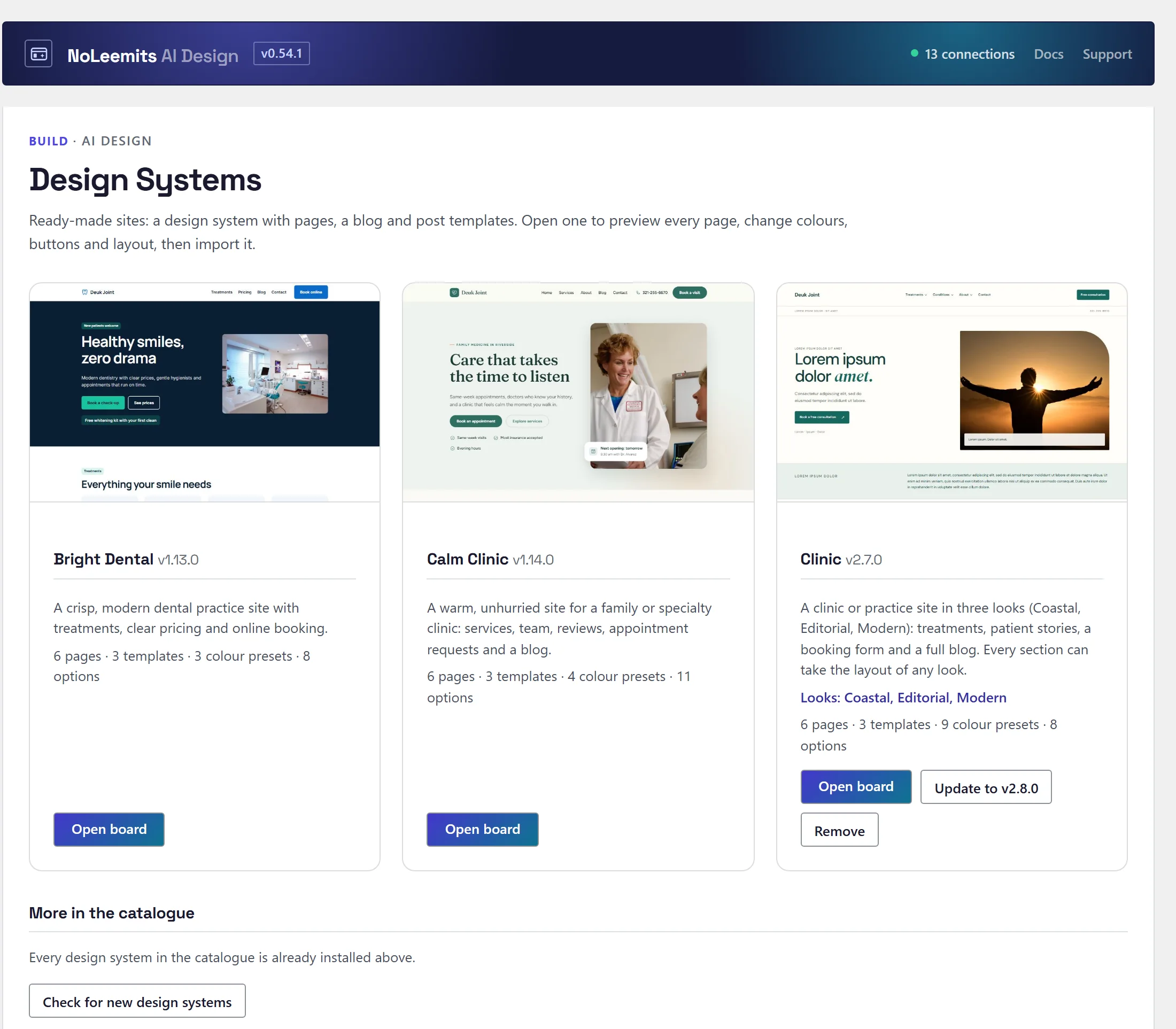
Design Systems sits right under Add Page in the Design Pages menu. Each design system shows once, with Update when the catalogue has a newer version.
 View full size
Getting more design systems
Open Design Pages → Design Systems and look under the catalogue. Each card shows a thumbnail and the colour swatches, with Install, Update, Open board and Remove. Check for new design systems refreshes the list.
Installing a design system changes no page. Every download is checked against our signature before it is used, so a file that doesn't match what we published is refused.
For AI: list_kit_catalog, install_kit, list_kits, get_kit, validate_kit.
The board
Click a design system on the Design Systems screen to open its board: every page on one canvas, desktop and phone. Drag to pan, Ctrl + scroll to zoom, and Fit shows two pages across. Every choice below previews live and is saved for the site.
Looks and colours
A design system can come in several looks: the same pages, designed differently. Clinic has three, Coastal, Editorial and Modern. Pick a look first, then any colour set from any look (the look's own sets are marked), then adjust individual colours.
The system's options cover buttons, corners, shadows, spacing, headings, eyebrow labels, the hero layout and the page width (narrow, standard or wide). The header can take a logo image, and the footer can have up to three menu columns.
Sites that imported Clinic Coastal, Editorial or Modern when they were separate design systems keep working: those names now open Clinic in the matching look.
Components
Under Components, swap the style of buttons (all at once or one at a time), links, cards, eyebrow labels, headings, form fields, question lists (accordions), tabs, review carousels, post cards and the blog's filter bar for styles from the library. The first choice is always the system's own.
Layouts
Under Layouts, choose the hero, header, footer and blog list (grid or list). Under Section layouts, any section can take the layout of another look (★ marks the ones designed for the look you chose), or be left out with None. Text is kept when you switch. When you change a section's layout, the board scrolls to that section and outlines it.
Importing
Pick one of three ways to import:
- Whole site (replace pages with the same slug). Also sets the header, footer and homepage.
- Only add what is missing. Pages you already have are left alone.
- Restyle only (colours and components, no pages). Changes the look of the site you have without adding or replacing pages.
New pages can go in as drafts or published. Click Preview changes first to see every page that will be added or replaced and whether your header, footer or homepage will change. If you skip it, the board runs it for you before importing.
If a page from an earlier import has been edited since, the board lists it and asks, page by page: Keep my version or Use the new design. Pages built with another page builder are never touched.
Forms
Contact forms are created in the form plugin you have: Gravity Forms, JetFormBuilder or Contact Form 7. With none of them, the contact sections use call and email buttons instead. After importing, check the new form's notification address so messages reach the right inbox.
Undo
The board lists Imports on this site, newest first. The newest one has an Undo button; imports are undone in order, newest first. Before it runs, Undo lists any pages it did not build that would lose their buttons and cards.
For AI: import_kit (run it with dry_run first), list_kit_imports, undo_kit_import (also takes dry_run), then set_business_info and patch_section for the client's own copy.
Blog, search and articles
The blog page shows topic chips made from the site's own categories, plus a search box. Both filter the list in place, and the address keeps the choice (?filter=, ?q=) so a filtered list can be shared. On category and search pages they are ordinary links and a normal search. Every design system includes a search results template.
Each article gets a table of contents built from its headings, once it has two or more: a box above the text, and a list that stays in view in the margin on wide screens. Long blogs get a Load more button, and category and search pages get page numbers. Both disappear when everything fits on one page.
If an author has no name set, the byline shows the business name (or the site name), never their login.
Template pages (single post, category, search) are kept out of sitemaps (WordPress, Yoast and Rank Math) and carry noindex, so visitors and search engines only ever see them through the posts they display. A post shown through a template prints its own schema as well as the template's.
For AI: {{terms:taxonomy=category}}…{{/terms}} for the chips, {{post_toc}} for the table of contents and {{pagination}} for page numbers.
Menus from chat
The AI can fill the header menu and any of the three footer menus with pages, links and dropdowns, without importing a design system (set_menu). The result is a normal WordPress menu that you can still edit under Appearance → Menus. The AI keeps a copy of what was there before, so the old menu can be put back in one step.
A menu placeholder shows two levels: {{wp_menu:ppd_header}}. Write {{wp_menu:ppd_header:3}} for three, or :0 for every level. set_menu warns when a menu is deeper than the page shows.
Rebuilding an existing site
Any section of any design system can go on any page, so an existing site can be rebuilt page by page in a design system's style without importing it whole. Lists of cards, steps and rows take any number of items, and optional parts disappear when they are empty.
Placing a section with its content
Ask the AI to pass the content when it places a design system section. Sample text it did not fill is emptied, and sample cards, steps or reviews past the last real one are removed, so none of the design system's sample copy stays on the page. Photos, icons and links in the items it filled are kept. Buttons, links, star ratings and other optional parts with no text drop out instead of showing an empty box.
Sections for the blocks most sites have
Besides the pages you see on the board, every design system carries sections the AI can place on any page:
- video beside text, a wide picture, an icon grid and a comparison table
- a hero on a photo or on a silent looping video
- a banner slider (a single banner works as a promo band on a photo)
- a logo strip for partners, insurers or awards
- a locations list with a search box and an optional map
- a form beside copy, and a photo gallery
- cards with a photo and up to two buttons, a strip of figures, and testimonials with a portrait
- a plain text section with subheadings, lists and links in the text
- a team grid of any size
- a list of rooms, packages or visit options with prices and a booking bar (a button to your booking page, or a booking plugin's search widget)
Most of them are on each design system's Procedure page, so you can see them on the board.
Checking the rebuild against the original
compare_to_source(page_id, url) reads the original page and lists every piece of it as present, reworded or missing on the new one. A missing paragraph is listed in full. It finds quotes, text inside testimonial widgets, photos set as a background and video files. Text the source repeats, such as a slider's copies of its slides, counts once.
Video frames that load late are read correctly, and an embed counts as present even when its address carries different settings. Small decorative images with no alt text (160px or less) are skipped and counted separately. The result also says whether the new page is visible to the public, so a full match on a draft isn't mistaken for a finished page.
For AI: list_kit_sections, insert_kit_section (takes look and layouts, as does import_kit), compare_to_source, and get_best_practices(topics: ["rebuild"]) for the full method.
Make your own design systems
From chat, a site owner can:
- save the whole site as a design system
- save the site's look as a new look of a starter such as Clinic
- keep a section in their own design system to reuse it on other pages
- have the AI design a new button, card or other component style from a description
Everything stays on the site. It shows on the Design Systems screen marked “Made on this site”, is never published anywhere, and passes the same checks as ours. Older pages that number their items one by one can still be saved, once you have told the AI that is fine.
For AI: save_site_as_design_system, save_site_as_look, add_section_to_design_system, get_component_contract, save_component_variant, delete_own_design_system, delete_component_variant.
Before you change the design
A change to a colour, a button style or the header can reach every page on the site. These tools show you what it will touch before it happens.
- Design Tokens screen. Shows how many pages a change reaches, and which pages will not change because their CSS has the old value typed in. Preview on real pages shows up to three pages as they are now and with the change, on desktop and phone.
- Undoing an import. Lists the pages the import did not build that would lose their buttons and cards.
- Site health on the Design Systems screen: which components are used and where, missing components, pages that have drifted off the design system, colours typed in instead of taken from the design tokens, images without alt text, placeholder forms, pages nothing links to, and which design system version each page came from. External links and page speed are not checked.
- Bespoke page: leave out of design checks, in a page's sidebar, for a page that is meant to look different. Design tokens still apply to it.
- Recent design changes lists every change to tokens, header, footer, components, shared sections and imports, each with Restore. The header and footer keep 15 versions.
For AI: get_design_impact, get_design_preview, get_design_health, list_design_changes, restore_design_change, update_post(design_bespoke) and undo_kit_import(dry_run).