We let an AI build our own product site. Here is the HTML.
Every page on noleemits.com was built by an AI agent through our own plugin. Not a demo, not a mockup, not a landing page we quietly rebuilt by hand afterwards. The product pages, the documentation, the release notes, and the post you read before this one. Open view source on any of them and you'll find ordinary HTML.
Vendors love saying "built with AI." Almost nobody shows you the markup, which is a bit like a chef refusing to let you see the kitchen. So here's ours.
Can an AI actually build a real WordPress page?
Yes, and I can be specific about it rather than waving at a screenshot.
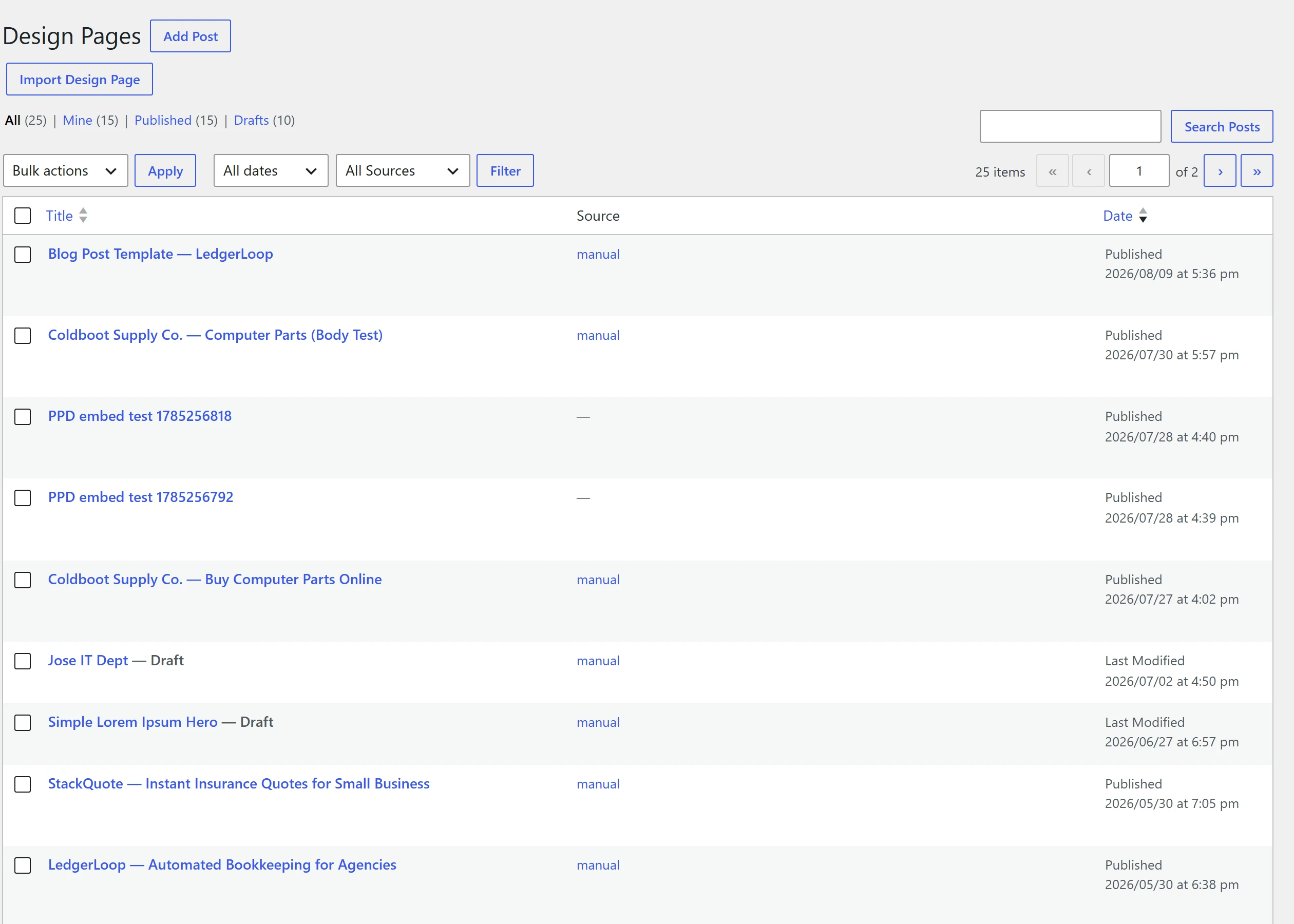
An agent built every one of these through NoLeemits AI Design's MCP server. Open any of them and view source:
| Page | What it is |
|---|---|
/ai-design/ |
Product landing page |
/ai-design/features/ |
Feature breakdown |
/ai-design/documentation/ |
Docs hub |
/ai-design/releases/ |
Release notes, generated from the plugin's own changelog |
…/getting-started/ |
Install and first page |
…/mcp-setup/ |
Connecting a client |
…/content-fields/ |
The section model |
…/theme-compatibility/ |
Render modes |
…/template-system/ |
Archives, CPTs, 404 |
…/third-party-widgets/ |
Embeds and shortcodes |
…/best-practices/ |
How to brief the agent |
…/pricing/ |
Tiers and trial |
Some of those run to dozens of sections apiece. I'm not printing the counts, because they change every time we ship and a number nailed into a blog post starts rotting the moment you publish it. Load the pages if you want to count.
The previous post on this blog was built the same way. That one is worth calling out separately: it went from a markdown draft to a live page through the same tooling, and I have the whole build trail for it.
 View full size
What did the AI actually write?
Plain HTML in your own database, which sounds like marketing until you look at it.
This is a real section from the live /ai-design/ page, copied out of view
source:
<section id="ppd-section-2" class="ppd-section" data-ppd-type="aid-trust">
  <section class="aid-trust">
    <div class="aid-trust__inner">
      <p>…</p>
    </div>
  </section>
</section>
(Paragraph text elided, since it's the structure that matters here.)
That's the whole thing. One wrapper carrying an id and a type, and inside it the
markup the agent wrote. No builder classes, no data-elementor-* attributes, no
serialized blob getting unpacked at render time.
In the database that section is stored as four fields. The markup, with
{{placeholder}} markers:
<section class="aid-phead">
  <span class="aid-phead__badge">{{badge}}</span>
  <h1 class="aid-phead__title">{{title}}</h1>
  <p class="aid-phead__desc">{{description}}</p>
</section>
The values, kept separately from the markup:
{ "badge": "Documentation", "title": "Documentation",
  "description": "Everything you need to install NoLeemits AI Design…" }
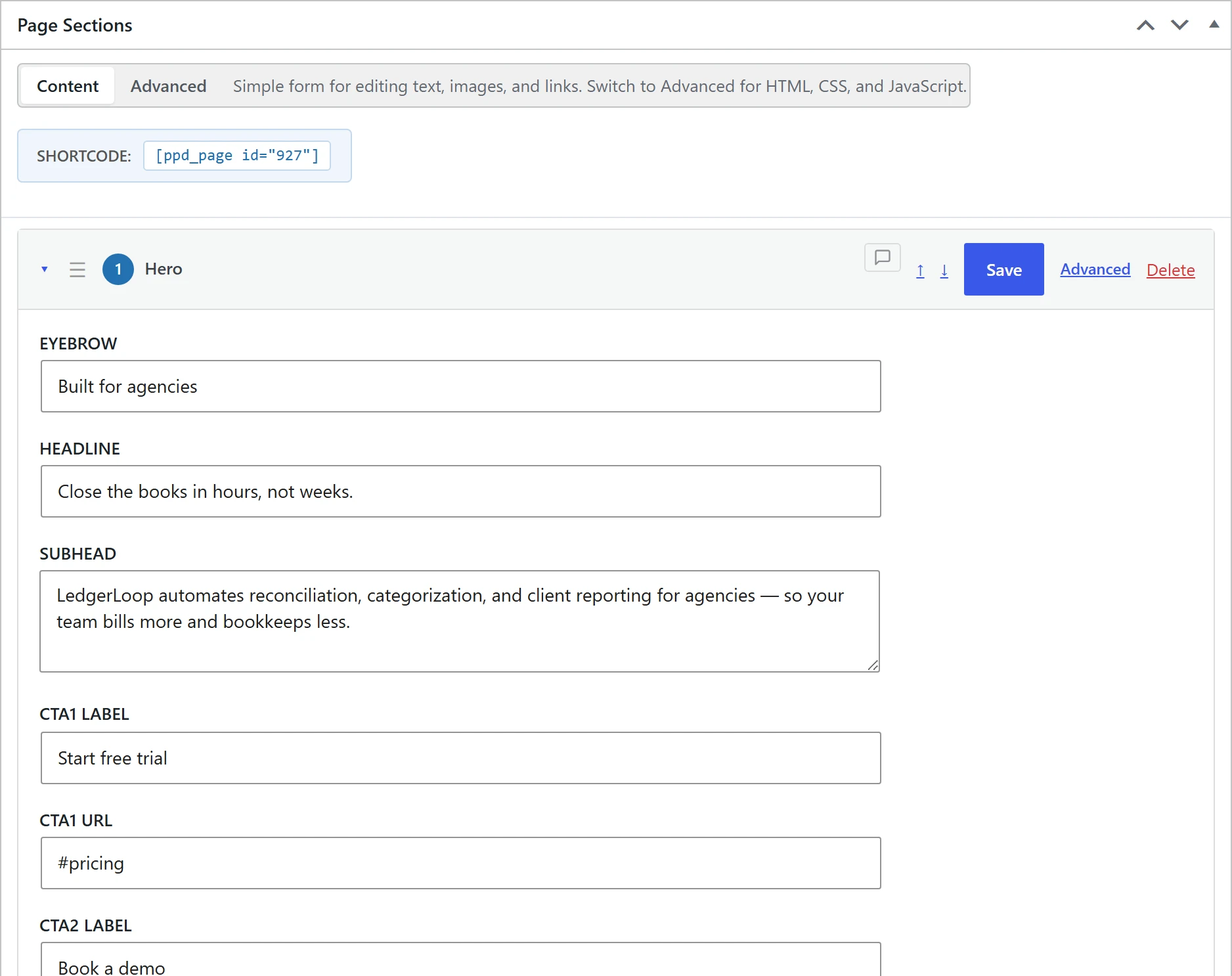
And the bit that makes it survivable, a schema describing each field:
{ "badge":       { "label": "Eyebrow",         "type": "text" },
  "title":       { "label": "Page title (H1)", "type": "text", "required": true },
  "description": { "label": "Intro",           "type": "textarea" } }
That last block is why a non-developer can edit this page. It generates labelled inputs instead of dumping someone into a code editor.
The agent read the site's design tokens before writing any of it, which is what keeps every page on the site looking related:
{ "colors": { "primary": "#667eea", "secondary": "#764ba2", "accent": "#f093fb" },
  "fonts":  { "heading": "'Space Grotesk', sans-serif", "body": "'Inter', sans-serif" },
  "spacing":{ "section-y": "80px", "gap": "2rem" } }
 Hover to pause · click for full size
How do you know a human didn't just rewrite it afterwards?
Because the build is scripted, and the scripts complain loudly when anything goes in by hand.
Nothing reaches the site as a hand-assembled payload. Every page goes through a
build step that validates first and refuses to emit anything if the section is
malformed. It catches two failures that are completely silent at render time. An
icon name that isn't in the shipped catalog renders an empty box. A
{{placeholder}} with no matching content field renders as literal curly braces
on the live page. Neither logs an error anywhere. You just get a page that looks
slightly broken and no clue why.
The output for the previous post looked like this:
✓ ai-page-building-wordpress-where-does-the-ai-write: 18 sections validated
updated #278 in place — 18 sections
validate_page: 18 sections, 0 warnings
Then a browser drives every page at desktop and mobile widths and checks the things you can't see in a DOM dump:
✓ 12 pages clean at 1440px and 390px; 31 internal links resolve;
  pricing copy matches the 2026-08-09 decision.
That run checks for HTTP 200, unresolved placeholders leaking onto the page,
broken images after scrolling so lazy-loaded ones actually resolve, horizontal
overflow, exactly one <h1>, and console errors. If I'd quietly rewritten a page
by hand, the next rebuild would flatten my edits and the diff would show it.
What broke?
Plenty, and this is the most useful section in the post.
The screenshot caught something every automated check passed. On the previous post, the intro paragraph got folded into the first section, which pushed that section's actual answer down to the third paragraph. Every DOM assertion passed. One look at a screenshot made it obvious. Automated checks confirm what you thought to ask about.
Two installs, two versions, nearly one wrong number. There are two WordPress installs on the build machine running different plugin versions. I counted a figure off the running server, which was the older one, and very nearly published it under the newer version's heading. The number turned out to be identical in both, so nothing shipped wrong, but it was luck rather than process.
A dead link nobody noticed. The navigation on every product page pointed at a blog index that didn't exist yet. It had been silently whitelisted in the link checker as a known gap, which is a great way to stop seeing a problem.
A schema field that saved nowhere. One section type declared an editable "heading" field it didn't actually have, which would render an input in the admin that quietly discarded whatever you typed into it.
None of these are AI problems. They're the ordinary problems of building a site, which is rather the point. The agent didn't produce mysterious output that resisted debugging. It produced normal output with normal bugs.
Did a human have to fix things?
Constantly, and anyone telling you otherwise is selling something.
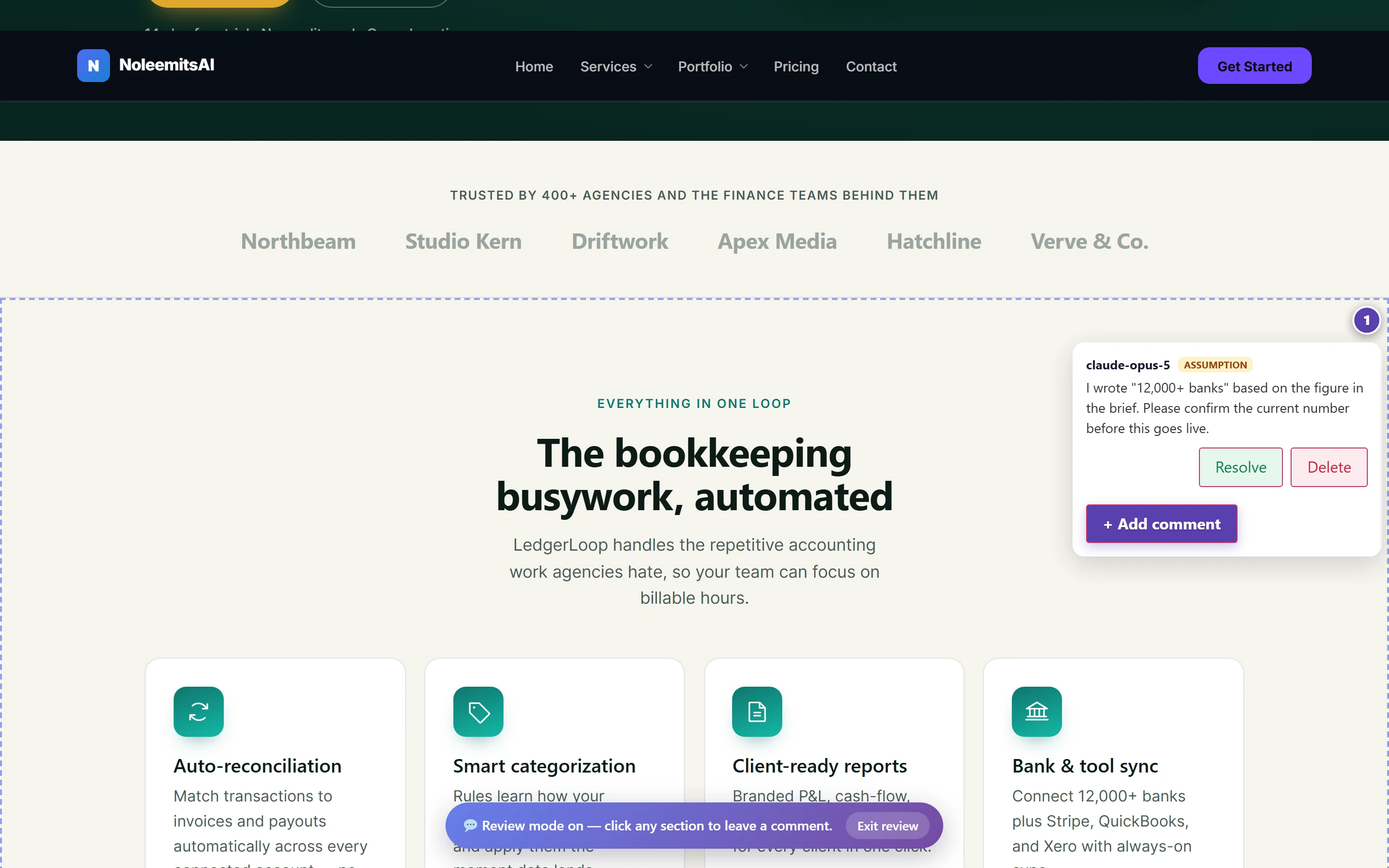
The agent wrote the markup. A human decided what was true. Every factual claim in the previous post was checked against the plugin's own source or a vendor's live page, with the date recorded, and three claims got cut for being unsourceable even though they read well.
The voice needed work too. The first draft had phrases that were technically fine and unmistakably machine-written. That's now checked by a script with a list of offending phrases in it. It costs nothing to run and beats the AI detectors, which score you on statistics rather than on whether you sound like a person.
Structure, sourcing, judgement, taste: human. Markup, consistency, and never getting bored on section 36 of the release notes page: agent. That split has held up well.
 View full size
Could I do this on my own site?
Yes, and the honest version is that it's less magical than it sounds.
Install the plugin, generate a bearer token, point an MCP client at your site, and ask it for a page. It reads your design tokens, picks images from your media library, and writes sections into your database. Your editors then maintain those sections through labelled inputs without touching code.
Start at Getting Started, then MCP Setup for the connection itself.
What this doesn't prove
- It doesn't prove the agent worked unsupervised. It didn't. A human reviewed every page and rewrote plenty of them.
- It doesn't prove your site will go as smoothly. This site's design system was already defined in tokens before the agent started, which removed most of the decisions an agent would otherwise get wrong.
- It doesn't prove AI writes good copy. It writes competent copy. The difference matters, and it's why a human still edits every word.
- It's tested with three clients, Claude Desktop, Claude Code and the Anthropic SDK. Other MCP clients should work and are unverified.
- Uninstalling stops the rendering. Your sections stay in post meta but stop being drawn. Convert to Page bakes them into a normal WordPress page first, and that conversion only runs one way.
More on all of that in where does the AI actually write?
FAQ
Did the AI write the CSS too, or just the content? Both. Every section carries its own scoped CSS, written by the agent, referencing the site's design tokens for colour and spacing. Nothing is picked from a theme's stylesheet, which is why these pages render the same on any theme.
What stops it inventing facts about your product? Nothing automatic, and that's the honest answer. The agent can leave a comment pinned to a section flagging a claim it wasn't sure about, which is genuinely useful, but a human still checks the claims. On the previous post three of them got cut for being unsourceable.
Could someone non-technical edit these pages now? Yes, that's the entire point of the field schema shown above. An editor gets labelled inputs for text, images, icons and colours. They never see the markup and can't accidentally break the layout by editing a headline.
Is the post I'm reading also built that way? Yes. It's a WordPress post whose body is NoLeemits AI Design sections, built from a markdown draft through the same validation and verification steps described above.
What happens if I don't like what it built? Every change is a revision that records who made it, whether human or AI, and through which client. Roll back to any earlier version, or export the page as JSON or HTML and take it elsewhere.
The build described here ran on 2026-08-10 against noleemits.com. Verification output is quoted from that run. Current version and release history live on the release notes, which are generated from the plugin itself.
Want your own site built like this?
Talk to us — we’ll build a real page on your site, live, and you keep the HTML.