AI Best Practices
How to brief the AI so it produces editable, on-brand, accessible pages instead of a wall of hardcoded markup.
Set the site up before you ask for anything
The AI reads your site before it designs. Give it something to read:
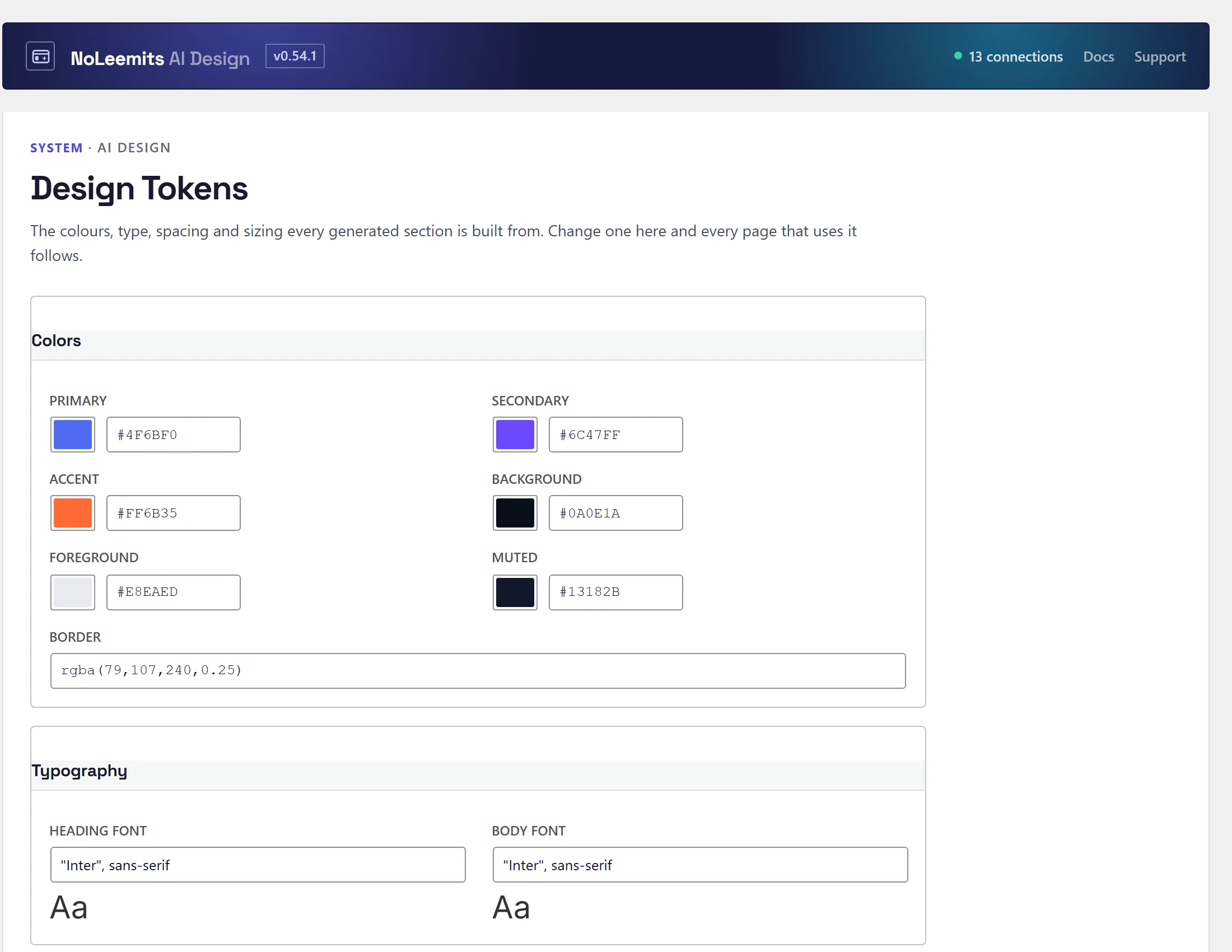
- Design tokens: Design Pages → Design Tokens. Colours, fonts, spacing, radius. Or start from a design system, which sets all of them at once.
- Business info: phone, email, address, socials.
- Global sections: header and footer.
Skip this and it will invent a palette, and every page will invent a different one.
 View full size
Brief it like a designer, not like a search box
Weak: "make a homepage"
Better: "Homepage for a family dental practice in Portland. Warm and calm, not clinical. Sections: hero with a booking CTA, three services, meet-the-dentist with a photo, two patient testimonials, insurance logos, contact with the CF7 form. Keep every headline and body paragraph editable."
Say what sections you want, what the page is for, and who edits it afterwards.
Rules the AI is given
Content
- Benefit-driven headlines, never "Welcome to our site".
- Action-oriented CTAs — "Start Free Trial", "Get Your Quote" — never "Submit" or "Click Here".
- Use social proof: testimonials, stats, logos, trust badges.
- Break up text with subheadings and bullets.
- One clear purpose per section.
SEO
- Exactly one
<h1>per page, used for the main headline. - Descriptive, keyword-bearing
<h2>/<h3>section headings. - Real structured content — lists and paragraphs, not divs full of text.
- Meaningful alt text on every image.
- Descriptive anchor text on internal links.
- Important content above the fold.
Accessibility
- WCAG AA contrast: 4.5:1 body, 3:1 large text.
- Everything interactive reachable by keyboard, with a visible focus indicator.
aria-labelon icon-only buttons.- Labels associated with form inputs.
- Never convey information by colour alone.
- A skip-to-content link on long pages.
Performance
- Shallow DOM — minimise nested divs.
- CSS for visual effects (gradients, shadows, shapes), not images.
- No inline styles; use
scoped_css. - Low CSS specificity, class selectors.
- Images are optimized automatically at render time —
srcset,sizes,width,height,loadingandfetchpriorityare injected for you. Don't hand-roll them.
Workflow
- For complex components (timelines, tabs, pricing tables, bento grids, accordions, carousels), call
get_component_templatesfirst and start from the proven skeleton. Don't build them from scratch. - Contact sections:
get_component_templates(type="contact"). Embed your form plugin, or use the no-form variant. Never a hand-written form. - Pull an image in from a web address with
import_image(name, alt text and featured image in one step).list_mediasearches what's already in the Media Library, so reuse before importing. - Search engine extras (video, FAQ and recipe rich results) go in the page's
page_schema. - For CSS fixes, use
css_overridesinpatch_sectionrather than resending the wholescoped_css. It saves 60 to 80% of the tokens on iterative edits. patch_sectionfor surgical changes (a headline, one CSS rule).replace_sectiononly when the whole structure changes.
The habit that matters most: keep it editable
Every headline and paragraph a human might ever change belongs in a content field, not baked into
template_html. The plugin warns the AI when a section is too hardcoded, but a clear brief prevents it
in the first place. Ask for a content_fields_schema too — that's what turns Content Mode into a properly
labelled form.
Repeating items and optional parts
Lists of cards, steps or rows don't need one hand-numbered block per item. A repeat block renders one copy per field set:
{{repeat:s}}<a href='{{s#_url}}'>{{s#_title}}</a>{{/repeat}}
That prints one card per s1_…, s2_… field set. {{if:eyebrow}}…{{/if}} drops an element whose field is empty ({{else}} is optional). Add or remove an item by adding or emptying its fields; the section editor has an Add item button.
Section anchors: patch_section(anchor: "watch") gives a stable #watch link. list_icons(search: "…") searches every Phosphor icon.
Working alongside the AI safely
- Edit locks — MCP writes honour WordPress post locks. If someone has the page open you get a
409 post_lockedrather than a silent overwrite. Only force it when you know what you're overwriting. - Section versions —
if_versiongives optimistic locking at section level, so two editors on the same page can't clobber each other. - Attribution — pass an
actorwhen your client knows who the real human is. It appears in the revision history above the token owner. Don't invent one. - Comments — the AI can flag an assumption for a human to confirm instead of guessing. Use them; that's what the channel is for.
- Read-only connections: for an assistant that should review but never change anything, approve its sign-in as Read only.
- Two builders: if Vision Builder Control is also installed, answer the builder question when the assistant asks it. Don't let the assistant switch plugins to avoid it.
Iterating
Preview after each meaningful change (get_preview_url). The link works without a login for 24 hours and stays the same across edits; revoke_preview_url ends it early.
Run validate_page too. It catches icon-name typos, broken image URLs, malformed CSS, images it can't match to the Media Library or that WordPress has shrunk, fields that will print their markup as text, dead forms, and broken video embeds. Validation returns warnings, not errors; pages save either way.
- Video links. A YouTube watch or share link (youtu.be) or a Vimeo page link in a video frame shows a blank box. The page check flags it and gives the embed address to use.
- Sample photos. An image that is still a design system's stock sample photo is named as one, so it is easy to tell from a photo you added.
Edits clear page caches automatically. bust_cache clears every layer it can reach and reports the rest; add warm=true to rebuild and confirm. A CDN still needs its own purge.